
If you’re suddenly being overwhelmed with sign-up emails, it could be a sign of something more serious
In September, reports emerged that a Virginia woman had been submerged by a flood of emails. Hundreds of automated messages poured in over 24 hours, including newsletters and promotions she’d never signed up to. But this was no ordinary spam campaign. The real reason behind the inbox blitz was to bury a legitimate email from the victim’s bank warning her about a fraudulent laptop purchase.
This is email bombing. And if it’s happened to you, it could be a warning sign that your identity or online accounts have been hijacked by fraudsters.
What is email bombing?
Sometimes called “form bombing,” “list bombing” or “subscription bombing,” email bombing attacks usually follow the same pattern. First, an attacker gets hold of your email address. They could do this from historic data breaches, marketing databases, online leaks, or even a prior phishing attack. Once they have it, they’ll use automated, bot-powered tools to sign up for hundreds or thousands of legitimate online services like newsletters, subscriptions, mailing lists, free trials, and competitions.
These will each generate a welcome email or similar. And because they are usually legitimate services, they’re often not blocked by spam filters. The result is an inbox overflowing with messages.
Why do they do it? Two reasons are behind most email bombing attempts:
- The scammer is trying to distract the victim so that they don’t see a genuine email among all of the artificially generated ones. They may have hijacked one of your accounts and reset the password, triggering a notification to your inbox. Or they may have made a fraudulent purchase in your name, with the invoice subsequently emailed to you. The main point is to create a smokescreen which prevents you from tackling the more serious fraud.
- The hacker may subsequently contact you pretending to be a tech support engineer. They’ll claim to be able to solve your email ‘problem’, and either request a fee to do so, or trick you into installing remote access software so they can take a look at your machine. That could enable them to steal sensitive information on your computer like passwords stored in the browser. Or even install additional malware.
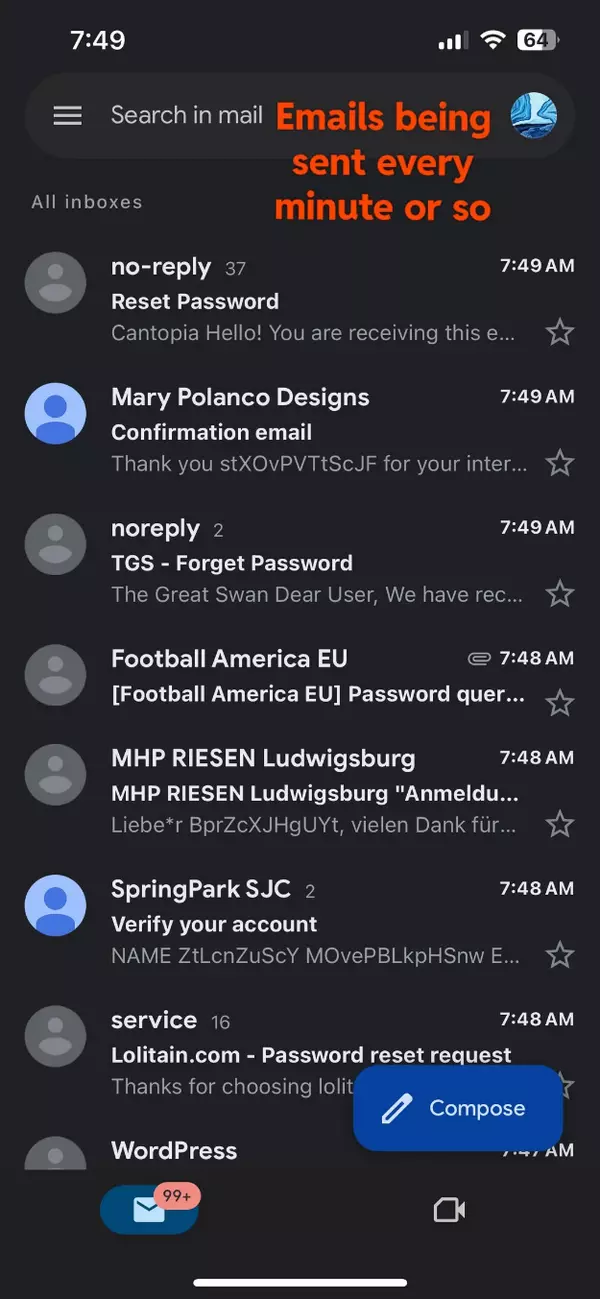
Source: Reddit
In a corporate scenario, the bomber is most likely trying to distract the cybersecurity team from a more serious attack, such as a data breach or a business email compromise or invoice fraud attempt. Alternatively, they may be trying to disrupt operations as leverage for extortion – ransomware affiliates have used email bombing as a precursor to a fake IT help desk contact to get remote access. Or it could even be a disgruntled employee or former worker.
I’ve been email bombed: what next?
If you’ve logged on to find your inbox overwhelmed, don’t panic. Rather than try to unsubscribe to all of the random services you’ve been signed up to, focus your energy on finding the threat that your attacker wanted to hide. Search for security alerts, new device sign-ins, email/phone number changes, password changes/resets, or purchases. Look through your spam folder as well as your inbox, in case the message has ended up there.
If you don’t immediately see anything out of the blue, check your most sensitive accounts individually. These could include:
- Bank/PayPal/credit card/crypto
- Apple/Google/Microsoft
- Social media accounts
Look for any suspicious activity: new devices or payment methods added, passwords that may have been changed, and/or recovery details altered. It’s also worth checking your email forwarding rules and sent/deleted items folders for anything unusual.
If you notice something unusual, try to lock the hacker out by changing the password to a unique, strong credential, and enable two-factor authentication (2FA) for extra login security. Ensure the correct recovery email address/phone number is listed (or they may be able to reset the account again). Contact the company itself if you’re concerned about fraud.
Remember to preserve anything related to a possible account takeover or fraud attempt. Only purge when you’re confident it’s over. You can do this more quickly by trying to identify patterns in the messages (e.g., senders, date ranges, domains, etc.). Then you can bulk select and delete in batches.
It goes without saying that you should put the phone down immediately if anyone calls you claiming to be a tech expert who can sort out your email problem.
How to prevent email bombing
Of course, prevention is usually better than cure. And while it’s not always possible to stop your email ending up in the wrong hands, you can limit the damage by ensuring that it’s not exposed on public-facing web pages like social media profiles. Also follow security best practices to stay safe from phishing attacks.
Next, keep your most sensitive accounts as secure as possible. This includes your primary email address, which will be used to receive password reset messages from other online accounts. Use a password manager to ensure they all have strong, unique credentials. And use 2FA for an extra layer of security (e.g., via an authenticator app or passkey).
It may also be worth using a secondary email address for less important correspondence like shopping, travel and other leisure activities. This way, if this account is hit by an email bomb, at least your most important messages (bank, government, healthcare, etc.) are safe.
There’s no silver bullet to prevent email bombing. But account security best practices will help to reduce the chances of an explosion of messages in your inbox.