For those who want to take matters into their own hands, virtual private networks (VPNs) and proxy servers are a good first step. They help protect digital privacy by routing internet traffic through a remote server to hide your actual location. But don’t get the two mixed up, or you could end up exposing your most sensitive data.
Let’s explore the main attributes of each, how they differ, and some common use cases.
Quick answer: The difference between VPNs vs. proxies
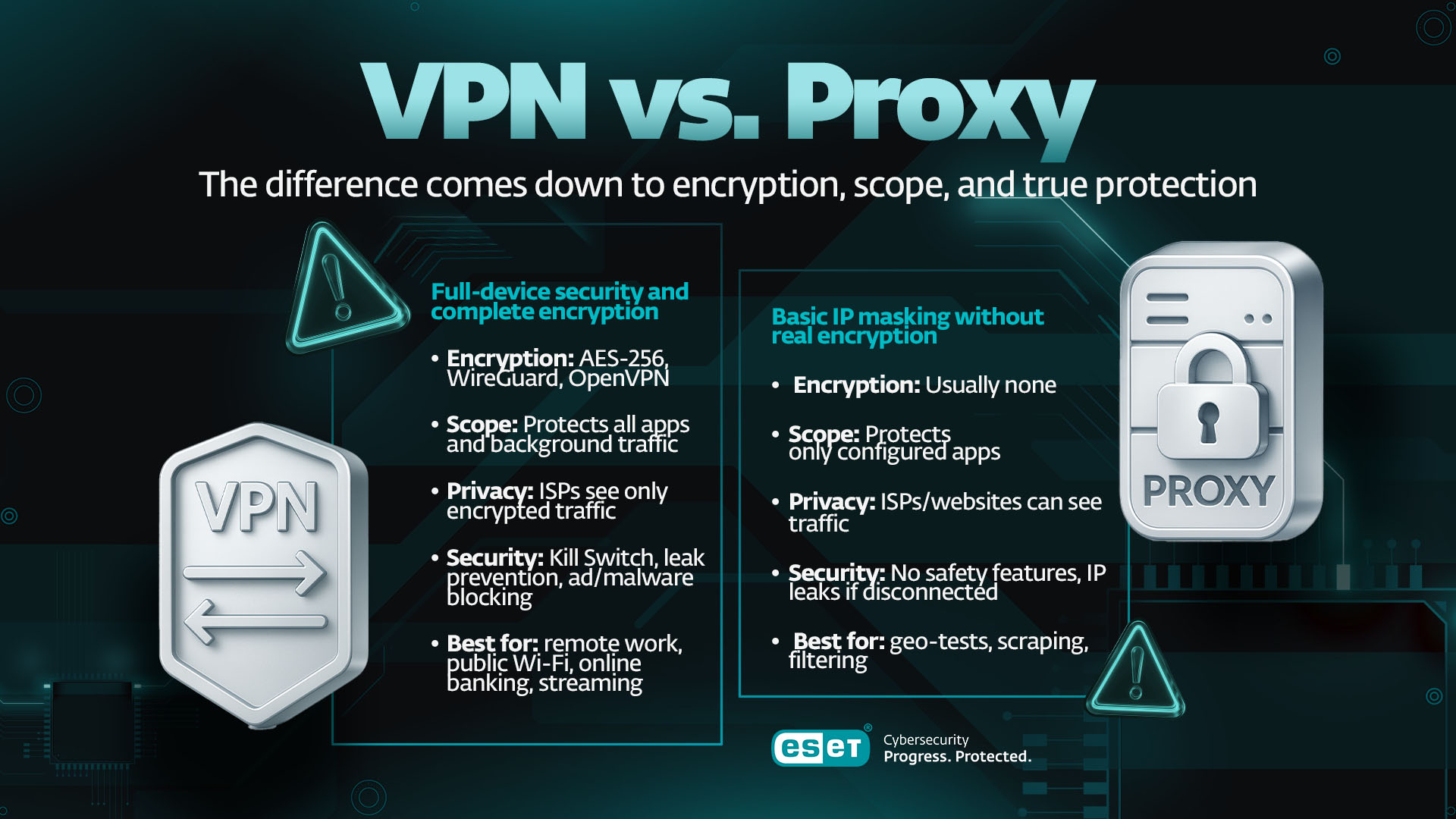
The difference between a VPN and proxy comes down to two critical factors: encryption and scope. A VPN is an all-encompassing security suite; a proxy is a simple, specialized traffic relay. If you remember one thing, it should be this: A VPN encrypts everything you do; a proxy usually encrypts nothing.
|
Feature |
VPN |
Proxy server |
Why it matters |
|
Data Encryption |
Mandatory (but not always military-grade AES-256) |
Usuall none (Unless a website uses HTTPS, or you use an encrypted proxy) |
Encryption is what makes your data unreadable to hackers and ISPs. |
|
Protection Scope |
Whole device (Protects all apps and websites, system-wide) |
Application-Specific (Only the browser or single app you configure) |
If one app is protected, but another isn't, you still have major security gaps. |
|
ISP Visibility |
High Privacy. ISP sees only encrypted data going to the VPN server. |
Low Privacy. ISP can often see the type of data and the final destination. |
An ISP that can see your data might choose to sell it to third parties, block specific sites or hand it to law enforcement/government. |
|
Best For |
Secure remote work, public Wi-Fi, sensitive transactions, streaming. |
Web scraping, simple geo-bypass, traffic monitoring. |
VPNs are best for security; proxies are designed for simple re-routing and app/use-case specific anonymization. |
Under the hood: Architectural differences
Let’s look at how each technology handles your connection request. Think of it in terms of crossing a river. It’s the difference between using a tunnel, where you can’t see the traffic or where exactly it came from. And using a bridge, which allows you to travel to a different location but leaves traffic visible.
What is a VPN? The end-to-end encrypted tunnel
A VPN does exactly what it says - creating a secure, private connection (encrypted tunnel) between your device and a server managed by the VPN provider. This tunnel integrates deeply with your computer/mobile device OS. By installing a virtual network adapter, it forces every single piece of data leaving your device - from your browser to your background system updates, to your email client - to travel through this secure tunnel. This is why we call it system-wide protection.
The engine room: VPN protocols
A VPN's speed and security are heavily reliant on the tunneling protocol it uses. These protocols define the encryption standards and connection methods. They include:
- WireGuard: The modern favorite. It features an incredibly lean codebase, making it faster, more reliable, and easier to check for security flaws. If you prioritize speed, low latency, and quick reconnections (especially on mobile), this is your protocol
- OpenVPN: The trusted industry standard. It's open source, highly audited, mature, and configurable. While it can be slightly slower due to heavier encryption, it’s a robust and reliable workhorse — perfect for environments where stability is needed
- IKEv2/IPsec: Often built directly into mobile devices. It excels at remaining connected when you switch networks, making it ideal for mobile users who frequently jump between Wi-Fi and cellular data.
What is a proxy server?
A proxy server is a simple intermediary that sits between your application/browser and the internet. It exists merely to relay your request, showing its own IP address to the destination website instead of yours.
Unlike a VPN, a proxy works at the application level. You must manually configure its address and port within a specific app (e.g., your Chrome settings). This is why a proxy is often less reliable for security - if you open a different app or use your computer's built-in mail client, that traffic bypasses the proxy completely and exposes your real IP.
Understanding proxy types
Not all proxies are created equal. Their function is dictated by their protocol:
- HTTP/S Proxy: Designed exclusively for web traffic. It "understands" web requests (GET, POST), making it fast for basic browsing or accessing geo-restricted websites. HTTPS has the added advantage of encrypting your data in transit
- SOCKS5 Proxy: The more versatile choice. It operates at a lower level and supports various traffic types, including UDP (essential for gaming and torrenting) and authentication. While more flexible, SOCKS5 still offers no native encryption
- Forward vs. reverse proxy: A forward proxy sits in front of users (e.g., a corporate firewall) to manage outgoing traffic. A reverse proxy sits in front of web servers to manage incoming external traffic for tasks like load balancing, SSL encryption/decryption or DDoS protection
Eight critical differences: Security vs. utility
Here are several more considerations to bear in mind when deciding between a VPN and a proxy.
Security: Encryption vs. cleartext
The idea behind a VPN is to wrap your data in an impenetrable cipher. As long as the encryption protocol is strong enough, intercepted data is rendered useless, ensuring confidentiality from start to finish.
Proxies act merely as a relay. Unless the website connection uses HTTPS, your data is sent in cleartext. Relying on a proxy for security is like sending a postcard. Although the address is changed, the message is open for anyone to read.
Privacy: Logging and ISP visibility
Reputable, paid VPNs follow strict, independently audited “no logs” policies. Your ISP can only see an encrypted blob of data going to a server. They have no idea what websites you’re visiting or what data you are sending.
Many free or public proxy operators log, collect, and sell your browsing data. Plus, your ISP can often analyze the data flow, the content of your traffic, and its eventual destination, which severely compromises your privacy goals.
Stability and fail-safes
Premium VPN clients include a kill switch. If your secure connection suddenly drops (e.g., you change Wi-Fi networks or the server crashes), the kill switch instantly cuts your entire internet connection, guaranteeing your real IP address and unencrypted data are never exposed.
Proxies have no built-in fail-safe. If the proxy connection fails, your application immediately reverts to your direct, unprotected connection, exposing your identity instantly.
The perils of "free" tools
The economics are simple: If the service is free, you are the product.
Paid VPNs operate on a subscription model, meaning their incentive is to protect your privacy in order to keep you as a customer. Paid proxies may also offer a higher level of protection, including encryption and “no logs” policies.
Free proxies and VPNs must make money somehow. They often resort to injecting ads, selling your bandwidth to third parties, or logging and selling your data to brokers.
Speed and consistency
Paid proxies may offer improved speed, reliability and uptime. However, free versions can become severely congested, leading to sudden slowdowns and frequent drops. A premium VPN with a fast protocol like WireGuard offers a more consistent and higher quality connection necessary for streaming or remote work.
Advanced feature sets
Some VPNs come packaged with critical features like split tunneling, which allows you to choose which apps use the VPN and which use your regular connection. Other features include DNS and IPv6 leak protection, and built-in ad and malware blockers.
Proxies are basic tools - they only provide routing and, in some cases, caching.
Getting set up
VPNs are designed for the average user. Getting started is usually as simple as downloading the app and clicking "Connect." The application should handle all of the complex system configuration automatically.
Proxies require manual configuration - you have to find the correct server address and port and input them separately into every application you want protected. This process can be tedious and prone to human error.
IP rotation and granularity
Proxies, particularly specialized residential and datacenter proxies, offer far greater IP rotation flexibility than a standard VPN service. For tasks like web scraping that require hundreds of unique, rotating IPs to avoid being blocked, a proxy is the better architectural choice.
Strategic deployment: When to choose each tool
Whichever option you choose, make sure it aligns with your goals. If the task involves sensitive data, it should be a VPN. If it’s about speed, scalability and IP rotation, a proxy is a better bet.
When to use a VPN
|
Use Case |
Solution |
Rational |
|
Working from home (remote access) |
VPN |
You need encrypted access and authentication to connect securely to your company’s internal network. |
|
Public Wi-Fi (café, airport) |
VPN |
Protects your entire device and data from local snoopers and man-in-the-middle attacks on untrusted networks. |
|
Streaming (Netflix, Hulu) |
VPN |
To access content otherwise restricted for users in certain geolocations. |
|
Torrenting & P2P |
VPN |
To download content via P2P networks anonymously, to bypass geo-restrictions. |
|
Banking and shopping |
VPN |
Guarantees an encrypted path for your sensitive financial data, login credentials, and personal information. |
When to use a proxy
|
Use Case |
Solution |
Rationale |
|
Web scraping / data aggregation |
Proxy (residential or SOCKS5) |
Managing high-volume requests and rotating IPs to avoid being blocked, rather than requiring additional security/encryption. |
|
Simple geo-bypass (non-sensitive) |
Proxy (HTTP/S) |
A quick, single-browser route change to check a localized website view or access low-sensitivity content. |
|
Testing website load times |
Proxy |
A developer needs a low-overhead connection to test site performance from a specific region, without the latency of encryption. |
|
Corporate content filtering |
Proxy (forward) |
Monitoring, logging, and restricting employee access to non-work-related websites. |
Advanced scenarios: Gaming, detection, and combining tools
Gaming: speed vs. security
In competitive gaming, every millisecond counts, making low latency critical. If your primary goal is the absolute fastest connection for low ping, a highly optimized SOCKS5 proxy might marginally shave off latency, but at the cost of zero protection.
However, your main aim may be DDoS protection, if you‘re concerned that gaming rivals may try to knock you offline. In that case, the only safe choice is a VPN using a lightning-fast protocol like WireGuard. This will hide your real IP, directing any malicious traffic to the VPN server instead of your home network.
Evading detection (streaming services & firewalls)
Both firewalls and streaming service providers are expert at spotting and blocking anonymization services. They do so in two ways:
- IP blacklists: They maintain lists of known IP addresses belonging to commercial datacenters. Using a cheap proxy or a basic VPN often means you’re on an IP that's already flagged.
- Protocol fingerprinting: They analyze the traffic's behavior and structure. If it looks like the signature of a known VPN protocol, it gets blocked. That's why top-tier VPNs now use advanced obfuscation technology – it makes the VPN traffic look exactly like normal HTTPS traffic.
Can you use both? (The double-hop)
Yes, you can intentionally chain a VPN and a proxy together for specialized security.
You would first connect your entire device to the VPN, which will secure all traffic with encryption. Then, you would configure one specific application (e.g., a browser used for a sensitive research task) to route its already-encrypted traffic through a separate proxy server. This gives you the privacy of the VPN combined with the specific, unique IP of the proxy.
Expert tips
„When comparing a proxy to a VPN, the latter is the clear winner in terms of security and privacy. However, using a VPN - even a premium one - means placing your trust in the provider and relying on their claims about “no logs” policies, data retention, and compliance with local or regional laws, especially when law enforcement comes knocking. So, in addition to considering technical factors, you should also ask yourself how much you trust your VPN provider with your sensitive information. True online anonymity is very difficult to achieve; for those who require the highest level of privacy, the TOR network with its onion routing may be a better alternative to most VPN services.“
- Ondrej Kubovič, Security Awareness Specialist
Make VPN your first line of defense. Get ESET HOME Security Premium with VPN for secure, private browsing.
Are you an entrepreneur needing VPN for your business? Enjoy unlimited VPN traffic and VPN for Router with ESET Small Business Security.

Final takeaway: VPNs protect, proxies route
When choosing between a VPN and a proxy, always ask yourself this simple question first:
"Is there any data I'm sending or receiving that I would be upset if a stranger read?"
- If the answer is YES (logins, banking, work documents, personal identity, anything sensitive), you MUST use a VPN
- If the answer is NO (simple, non-sensitive website browsing, checking a blocked video, automated data collection), a proxy may be sufficient
The truth is, for 99% of internet users today, the features offered by a VPN - comprehensive encryption, system-wide protection, and a kill switch fail-safe - make it the better choice for security and privacy.
Start with a reputable, audited VPN for daily security - and reach for proxies only when you have a defined, controlled purpose for them.
Frequently asked questions
Which is better for privacy - VPN or proxy?
VPN. It encrypts all traffic and hides activity from ISPs, proxies don’t.
Can I use both together?
Yes. The safest and most common setup is VPN → Proxy – encrypted first, then routed through the proxy for a specific IP or region.
Are free VPNs and proxies safe?
Rarely. Many free services log your data, inject ads, or sell traffic metadata. Always check privacy policies and independent audits.
Which is faster?
A proxy is faster in theory (no encryption), but premium VPNs using WireGuard often outperform free proxies due to better infrastructure.
What’s best for streaming?
A premium VPN. It can bypass geo-restrictions more reliably than any proxy.
When would I choose a proxy?
For specific tasks like high-volume web scraping and data aggregation, simple geo-bypassing, and testing website loading times.
What’s the best option for gaming?
It depends on your goal. If it‘s low latency, a highly optimized SOCKS5 proxy may be best. If you want DDoS protection, consider a WireGuard-powered VPN.