
You get a text message saying your package couldn’t be delivered. It looks routine, you can see that your address is slightly off, and there’s a link to “reschedule delivery.” You’ve been expecting a parcel, so you tap it without much thought. Within seconds, a convincing courier site opens, asking for a small fee to redeliver. It’s only a few bucks, nothing suspicious.
We have all been in situations like this, and it’s not hard to imagine what would happen next: Paying the fee would mean losing the money to scammers, along with the stress that comes from handing them your card information in the process.
Scams are a global problem that is increasingly targeting younger people using mobile devices and social media. Despite many scams seeming quite simple, anyone can fall for a scam, especially when you are in rush or you are tired. At the same time, some scammers have also stepped up their game and are coming up with more sophisticated attacks that are not so easy to spot.
Read further to discover the most common phone scams targeting Android users and what to do to stay protected.
Vishing (short for voice phishing)
Vishing is an umbrella term for phone-based scams carried out via calls. In a vishing attack, a scammer calls their target pretending to be a trusted person or organization, such as a bank or government agency, and then works to manipulate you into revealing sensitive information or to convince you to transfer money.
SMS messages from banks, delivery companies, etc. with malicious links (smishing)
Smishing is similar to vishing but utilizes SMS messages instead of phone calls: Scammers send text messages pretending to be, for example, banks or delivery companies, urging you to click a link to “verify” details or track a package. The link leads to phishing sites that steal login or payment information.
How to avoid being scammed by phone:
- Don’t answer unknown numbers – Let unfamiliar calls go to voicemail. Scammers often hang up if they can’t engage you.
- Verify the caller independently – If someone claims to be from a bank or company, hang up and call the official number from its website.
- Never share personal or financial info – Legitimate organizations won’t ask for passwords, PINs, or full card numbers on calls.
- Beware of urgency or threats – Scammers pressure you (“act now,” “account will be closed”) to make you act without thinking.
- Ignore too-good-to-be-true offers – Prize winnings, lottery claims, and miracle deals are all common scam tactics.
- Don’t follow instructions blindly – Avoid downloading apps, sharing codes, or transferring money based on a caller’s request.
- Use Android cybersecurity protection – High-quality solutions can help you deal with spam calls, recognize phishing, and protect against malware.
- Trust your instincts – If something feels off, hang up or don’t respond. It’s better to be safe than sorry.
Spoofed caller IDs (look like bank/police)
Spoofing is a technique in which attackers use a fake caller ID to appear as trusted institutions (e.g., your bank or law enforcement). This technique is used in various scams, such as attackers creating urgency to trick victims into sharing sensitive data or transferring money.
WhatsApp/Signal/Telegram “family in trouble” money requests
Scammers impersonate relatives or friends (often claiming a new number) and say they’re experiencing an emergency, asking for immediate financial help. The goal is to pressure quick, unverified payments.
Fake tech support calls pushing remote control apps
Fraudsters pose as tech support (e.g., Microsoft or Apple), claiming your device is infected. They convince you to install remote access software, giving them control to steal data or money.
Scam in spam calls
Spam calls can be annoying, but not all spam is a scam. Some spam calls can be for legitimate purposes like reminders from your doctor’s office or telemarketing calls. On the other hand, malicious scam campaigns also often feature spam — repeatedly calling thousands of people with a fraudulent story, such as claiming their computer has been hacked but tech support can help. 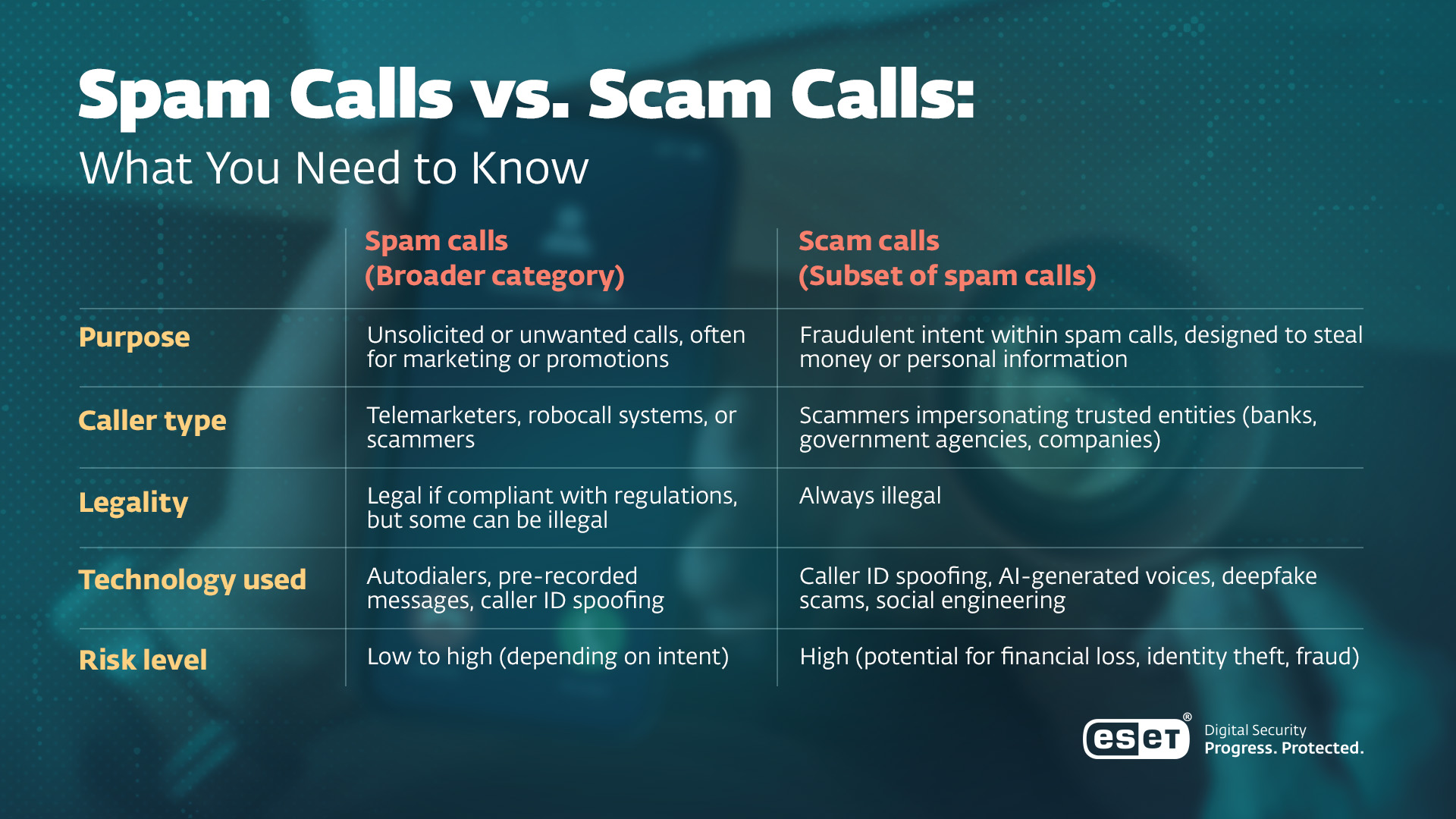
Image 1. The difference between spam calls and scam calls.
Bank scams
Scammers impersonate bank representatives via calls, emails, or messages, claiming suspicious activity. They manipulate victims into revealing credentials or one-time codes or authorizing fraudulent transactions.
NGate scam
Highly sophisticated variations of bank scams exist too. For example, combining social engineering with the NGate malware, which abuses the near-field communications technology used for contactless payments.
Attackers pretend to be bank employees informing users that their accounts have been compromised and urging them to install a new banking app, which is in fact NGate malware. Once the malware is installed, attackers can make unauthorized ATM withdrawals from the victims’ bank accounts.
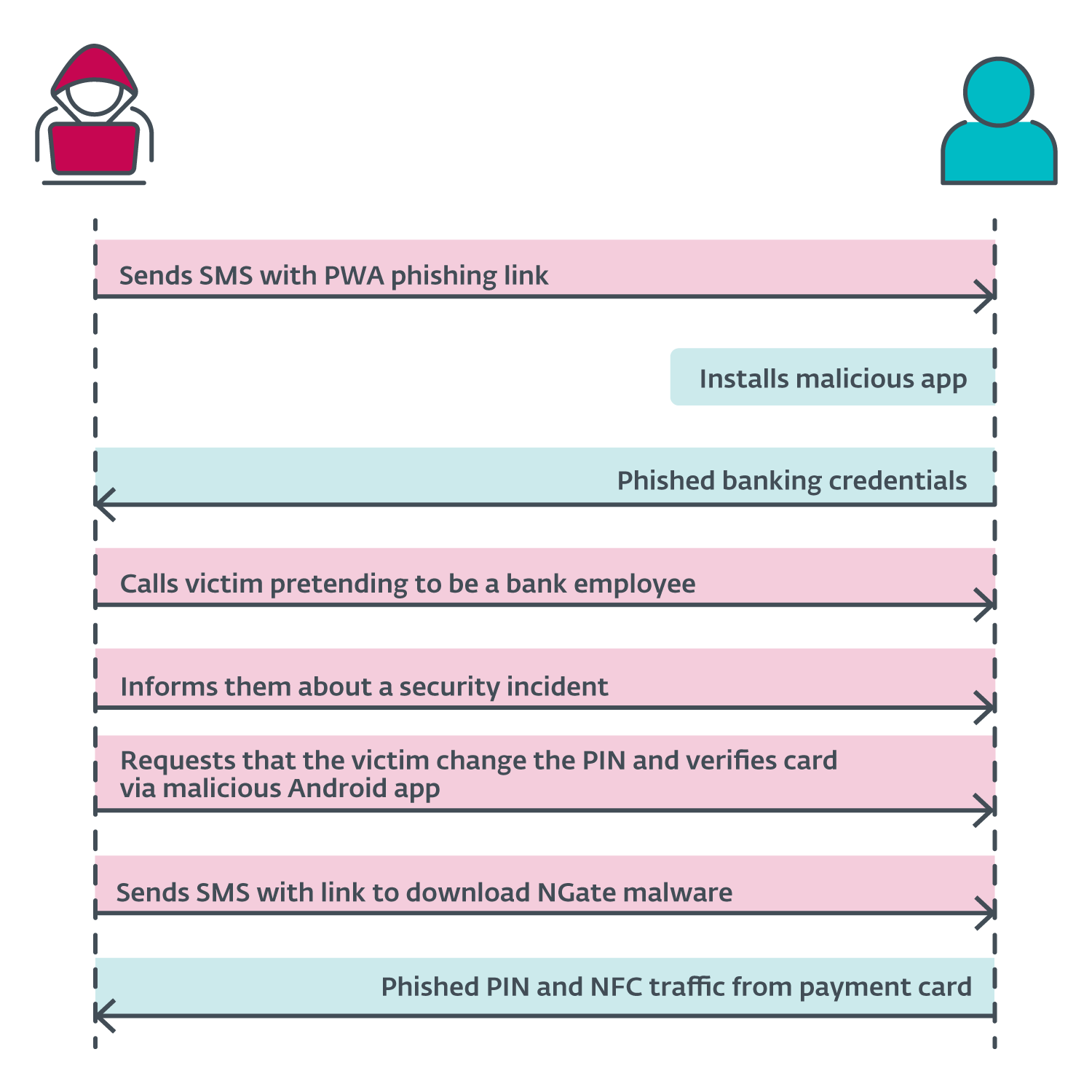
Image 2. The specific attack scenario for the 2024 NGate malicious campaign
IRS/tax authority scam
Scammers pretend to be from tax authorities, claiming you owe unpaid taxes and threatening arrest or penalties unless you pay immediately, often via gift cards or wire transfers.
Lottery or prize scam
You’re told you’ve won a lottery or prize but must first pay a fee or tax to claim it even though you never entered any contest.
Healthcare/insurance scam
Fraudsters pretend to be from healthcare providers or insurance companies, requesting personal or billing information under the guise of verifying coverage or offering services.
Scams: How big is the problem?
The Global Anti-Scam Alliance estimates that scams cause around $442 billion in losses annually.
Among those susceptible to being scammed, 26% are millennials (born roughly from 1981 to 1996), 27% are Gen Z (from 1997 to 2012), and 26% have higher education, compared with the global average of 23%.
The top two most common communication channels for fraudsters are phone calls (53%) and text/SMS messages (51%).
Utility company scam
The caller claims to be from a utility provider and threatens to shut off your electricity, gas, or water unless you make an immediate payment.
Job offers or employment scam
You’re offered a job over the phone with little effort required but are later asked to pay for training or equipment or to submit to risky background checks and to share sensitive personal information.
Nomani scams
Fake adds on social media lure victims to phishing websites and online forms designed to harvest personal information, using AI-generated deepfake videos featuring famous personalities and both well-known local and global companies to increase credibility. These fake ads promote allegedly secret investment opportunities, miraculous dietary supplements, and bogus legal or law enforcement assistance.
Description: ESET Security Awareness Specialist Ondrej Kubovič uncovers Nomani scam.
A romance scam (dating scam or love scam)
Attackers pretend to be romantically interested in another person and engage in conversations via chat apps or social network apps to gain trust and then steal money or personal information.
Fake app scams
An umbrella term for scams that involve tricking users into installing fake malicious apps that spy on them and/or steal their money. This scam can have many forms:
Fake services: Many malicious apps pretend to have legitimate functionalities like antivirus, removal (cleaning) of photo duplicates, loan services, news, and so on. Some fake apps offer unrealistic services, such as providing the phone’s call history for any number.
Fake cryptocurrency wallet: Typically, scammers create counterfeit versions of popular wallets to steal private keys, recovery phrases, and ultimately, money.
Fake games: Attackers often prey on popular Android games and create malicious look-alikes.
Fake dating/chat apps: Victims engage in communication with a stranger who persuades them to install another app that is allegedly safer or provides cool functionality. Another variation is online promotion of secure chat apps that are in fact malware.
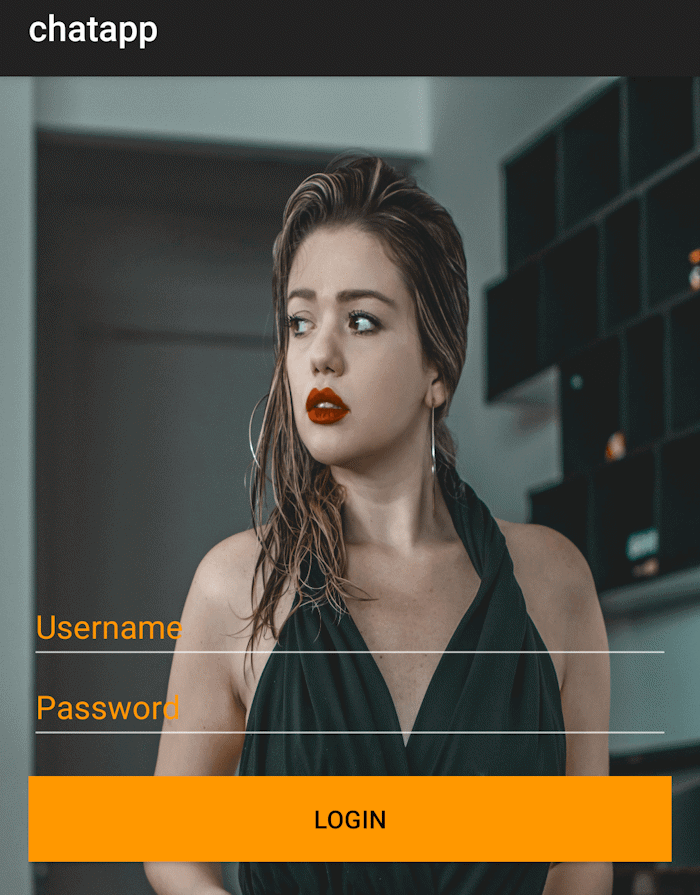
Image 3. Login screen of GhostChat, a malicious Android app disguised to appear as a legitimate chat platform.
One-ring scam
Also known as Wangiri fraud, this scam relies on missed calls to lure victims into calling back. Scammers use automated systems to dial large numbers of phone users and hang up after one ring, leaving a missed call notification. If the recipient returns the call, they are connected to a premium-rate number, often located abroad, for which charges are significantly higher than standard calls. The call may be prolonged through recorded messages, music, or deliberate delays to increase the cost. The scheme can result in unexpectedly high phone bills for the victim.
Robocall “Can you hear me?” scam
An automated call prompts you to say “yes,” which may be recorded and later used to authorize charges or agreements. Be aware that this scam made headlines in 2017; however, later investigations found no real victims, only people complaining about calls. This means that the scam may be a real threat but may simultaneously also be an internet hoax.
How ESET can protect your device
AI-Powered Anti-Malware – If scammers try to trick users into downloading and installing a malicious app, ESET Mobile Security can detect it and warn the user.
Anti-Phishing – When a scammer tries to lure the user into clicking on a malicious URL, ESET Anti-Phishing can recognize the link and alert the user. ESET Anti-Phishing includes web browser protection, social application protection, SMS/notification protection, and the Link Scanner, which can recognize phishing links coming from apps.
Payment Protection – This feature adds an extra layer of security to apps like Google Pay or your mobile banking app. When active, Payment Protection prevents malicious apps from reading, modifying, or overlaying content on your protected apps.
Adware Detector – This tool identifies intrusive adware masquerading as a harmless app or apps (e.g., calculators or flashlights) that try to display full screen ads even when not in use.
Call Filter – This tool provides another layer of protection against spam and scam calls. Call Filter allows users to create customized rules for blocking and filtering incoming calls.
Security Report – Users can check the security status of their phones in this simple, comprehensive overview of how the device is being protected. Security Report summarizes the status and activity of key security modules.
Frequently asked questions (FAQs)
Who is at risk of phone scams today?
Phone scams can affect anyone, but younger generations are also increasingly being targeted. Around 26% of millennials and 27% of Gen Z users have been affected, slightly above the global average. This shows that scammers are further adapting to both mobile and social platforms.
What are the most common ways scammers contact victims?
The two most common channels are phone calls (53%) and SMS/text messages (51%). These often include fake messages from banks or delivery services, as well as spoofed calls that appear to come from trusted organizations.
What are typical signs of a phone scam?
Common warning signs include urgent requests, threats (e.g., account closure or arrest), unexpected prize claims, or requests to install apps or share sensitive information. Scammers often try to create panic to rush user decision-making.
What is the difference between a phone scam and a spam call?
A phone scam is a type of call in which the caller has malicious intent and tries to deceive the victim to steal money, personal information, or access to accounts.
A spam call is typically an unsolicited and unwanted call, but it is not always harmful or fraudulent. These calls are usually made for marketing purposes, such as selling products, promoting services, or conducting surveys. While they can be annoying and intrusive, they do not necessarily aim to steal sensitive information. However, some spam calls can also serve as a gateway to scam attempts.
How can I protect myself from phone scams?
Avoid answering unknown numbers, verify callers through official channels, never share sensitive information, ignore suspicious links or offers, and use mobile security tools.