
Free virus scan
for Android

Quick, accurate, and completely free Android virus scan to detect malware instantly. No credit card required.

Free virus scan for Android

Quick, accurate, and completely free Android virus scan to detect malware instantly.
No credit card required.

Download free antivirus or upgrade in-app to get Premium features free for 30 days.
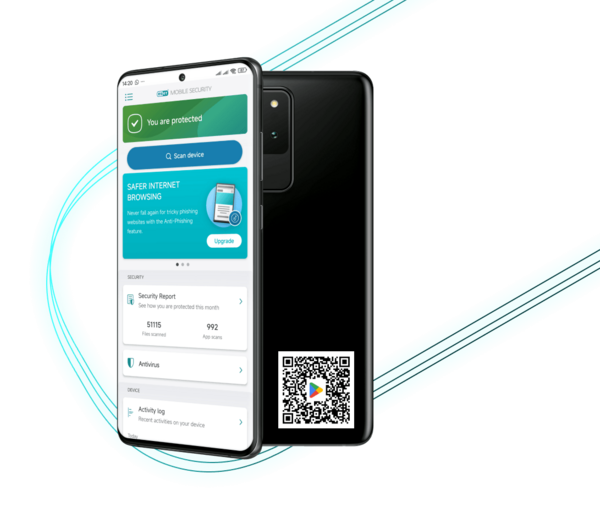



Free virus scan
for Android

Quick, accurate, and completely free Android virus scan to detect malware instantly.
No credit card required.

Download free antivirus or upgrade in-app to get Premium features free for 30 days.

Rated 4.8 / 5 by over 1 million ESET users on Google Play


Android scan features

Smart Scan

Quickly scans the most critical areas of your device, providing fast results.

In-depth Scan

Performs a thorough examination of your entire device, identifying deeper hidden threats.

Real-Time Protection

Automatically scans new apps and files for threats as soon as they're downloaded.

Android scan features

Smart Scan

Quickly scans the most critical areas of your device, providing fast results.

In-depth Scan

Performs a thorough examination of your entire device, identifying deeper hidden threats.

Real-Time Protection

Automatically scans new apps and files for threats as soon as they're downloaded.


Awarded by experts.
Loved by users.
Trusted by millions.

Awarded by experts.
Loved by users. 
Trusted by millions.


Why run a virus scan on your Android device?

Why run a virus scan on your Android device?

Detect malware instantly

Run quick or in-depth scans to instantly uncover hidden threats, including viruses, spyware and adware.

Real-time app scanning

Automatically scans new apps and downloaded files 
to keep your device safe 24/7.

USB On-The-Go Scanner

Scans external USB storage devices immediately upon connection 
to ensure that no threats enter your device.

Lightweight and fast

Runs quickly without draining the battery or slowing down the device, 
allowing you to complete your scan efficiently.


How to scan your Android device

How to scan your Android device

1. Download and install

Tap here to download and install ESET Mobile Security from Google Play for a free virus scan.

2. Set permissions

Approve necessary permissions to enable comprehensive scanning.

3. Choose scan type

Select “Smart Scan” for a quick overview or “In-depth San” for a thorough check.

4. Scan & review results

Run your chosen scan and instantly review identified threats.

5. Remove threats

Quickly quarantine or delete identified malware directly from scan results.

6. Enjoy free 24/7 protection

Just keep ESET Mobile Security installed with permissions enabled - no subscription needed.

1. Download

and install

Tap here to download and install ESET Mobile Security from Google Play for a free virus scan.

2. Set
permissions

Approve necessary permissions to enable comprehensive scanning.

3. Choose
scan type

Select “Smart Scan” for a quick overview or “In-depth San” for a thorough check.

4. Scan & review
results

Run your chosen scan and instantly review identified threats.

5. Remove
threats

Quickly quarantine or delete identified malware directly from scan results.

6. Enjoy free 24/7 protection

Just keep ESET Mobile Security installed with permissions enabled - no subscription needed.

1. Download

and install

Tap here to download and install ESET Mobile Security from Google Play for a free virus scan.

2. Set
permissions

Approve necessary permissions to enable comprehensive scanning.

3. Choose
scan type

Select “Smart Scan” for a quick overview or “In-depth San” for a thorough check.

4. Scan & review results

Run your chosen scan and instantly review identified threats.

5. Remove
threats

Quickly quarantine or delete identified malware directly from scan results.

6. Enjoy free 24/7 protection

Just keep ESET Mobile Security installed with permissions enabled - no subscription needed.


Frequently Asked Questions

Frequently asked questions

How can I scan my Android phone for viruses for free?

Just download the ESET Mobile Security app and tap “Scan Now.” It’s quick, easy, and completely free.

Does Android have a built-in virus scanner?

Not exactly. Android offers basic security features, but it doesn’t include a full-fledged virus scanner. For comprehensive protection, apps like ESET Mobile Security are recommended.

How do I remove viruses from my phone for free?

Install the free version of ESET Mobile Security, run a scan, and it will automatically detect and remove any malware found.

What’s the best free virus scanner for Android?

ESET Mobile Security offers accurate malware detection, Smart and In-depth scan options, real-time app monitoring, and OTG scanning, all available for free. It ranks among the highest-rated security apps on Google Play.

Is ESET Virus Scan compatible with my Android device?

Yes, ESET Mobile Security is compatible with most Android smartphones and tablets running Android 9.0 or later. It’s optimized for performance, works seamlessly across a wide range of devices, whether you're using a budget phone or a flagship model.



Your free virus scan is one tap away


Download ESET Mobile Security on Google Play to detect malware 
instantly and keep your device safe.