YouTube is a central part of many children’s digital lives, with industry estimates suggesting that around 700 hours of new video are uploaded to the platform every minute. According to Ofcom’s 2025 report, YouTube has become a default choice for younger audiences: one in five children aged 4–15 in the UK goes straight to the app when they turn on the TV, while 16–24-year-olds watch live broadcast TV for just 17 minutes a day on average. With so much content on YouTube, it’s increasingly hard for parents to ensure children avoid harmful videos, even with all the parental tools the platform has introduced. This guide explains how to use these features alongside open communication with your children to build safe, healthy viewing habits in 2026.
Key points of this article:
- YouTube can be an important part of children’s digital lives, so safety is less about banning it and more about guiding how it’s used.
- Open, age-appropriate conversations about what children watch, who they follow, and how they feel online are the foundation of safe viewing.
- Knowing the main types of content kids consume helps parents spot risks and choose suitable channels.
- Tools like Restricted Mode, YouTube Kids and supervised accounts can filter and limit content, but they work best when combined with active supervision.
- Actively personalizing what children see through curated playlists, trusted subscriptions and adjusted recommendations keeps the algorithm from fully taking over.
- Giving children some control, such as helping choose content and teaching them to block or report harmful videos, builds digital awareness and long-term resilience.
Build shared understanding
Your approach to YouTube should always reflect your child’s age and maturity. According to Google: “children under 13 can use the YouTube Kids app where it’s available. However, they can’t use any other YouTube apps, websites or features until they turn 13.” So, your children may need close, hands-on supervision, while older kids and teenagers benefit more from clear boundaries, trust, and gradual independence. In both cases, open conversation comes first.
Take time to sit down together and talk about online safety. Explain what worries you and why certain types of videos may not be okay for your kids yet. For example, you might be concerned about:
- unboxing videos that encourage constant buying of unneeded items
- gaming videos that include violence, swearing, or toxic behavior
- risky YouTube challenges or pranks that children might be tempted to copy
- fast, endless scrolling through YouTube Shorts that makes it hard to switch off
Be curious, not just controlling. Ask your child what they like to watch, which creators they follow, what they usually search for, and when they tend to use YouTube during the day. Understanding what they enjoy and why makes it easier to set rules that feel fair and realistic rather than random or purely restrictive.
Inform them about how algorithms work and how those can shape their feed and point them towards some biased content without them even noticing.
It’s also important to talk about comments, live chats, and reactions. Children should know that:
- they must not post hateful or hurtful comments
- they do not have to respond to negative or aggressive messages
- trying to defend a favorite creator can quickly expose them to more abuse than they can handle emotionally
Encourage them to tell you when they see something upsetting, confusing, or hostile — whether it’s in a video or some comment under it. Make it clear that coming to you is a smart way to handle difficult online situations together.
What children usually watch on YouTube
Gaming content (Let’s Plays, streams, and clips)
Kids often visit the worlds of Minecraft, Roblox, or Fortnite not just for the gameplay, but for the creators who narrate, joke, and socialize their way through Let’s Plays, livestreams, and rapid-fire highlight clips. Those spaces feel lively and communal, but they also hide some sharp edges. Alongside the fun, kids may come across scam links promising “free bonuses” or “exclusive downloads” that actually install malware. And the social side of gaming isn’t always harmless either. Open chats and private messages can create opportunities for grooming, as strangers can easily slip into the conversation under the guise of friendly interaction.Unboxings and toy/product videos
Unboxing videos show creators opening toys, games, collectibles or tech. They can be exciting for younger children, but they may also fuel constant “I want this too” pressure and unrealistic expectations about gifts.Makeup, fashion, and lifestyle
Older children and preteens are drawn to hauls, “Get Ready With Me” videos, morning or night routines, and simple lifestyle vlogs. These videos can be fun and inspiring, but they sometimes promote heavy consumerism or more adult themes. Plus, they might lead to negative body image and even affect their health and skin by using inappropriate products for their age group.Vlogs and everyday-life content
Vlogs often follow creators through their daily routines, trips, friendships or opinions. For children, these can feel very relatable which makes it important to check the tone and values of the channels they follow.Comedy, challenges, and reaction videos
Fun channels include parodies, skits, pranks, challenges and reaction videos. Some are harmless and creative; others may normalize risky behavior, bullying, or mean-spirited humor. Challenges in particular are problematic if children try to copy them.Short-form videos (YouTube Shorts)
Shorts are ultra-brief, swipeable clips that children can scroll through for long periods of time. They often feature jokes, quick reactions, mini gaming moments or trends from other platforms. Because Shorts are heavily driven by algorithmic recommendations, they can expose children to unexpected content very quickly. They also can lead to addiction and a behavior known as doomscrolling — spending an excessive amount of time watching short-form content.Cartoons and animated stories
Many channels are dedicated to cartoons, nursery rhymes and animated stories. Some are created by major studios or well-known brands, others by smaller creators. Quality and tone can vary widely, so it’s still worth checking individual channels rather than assuming that every cartoon is safe.Educational and edutainment channels
YouTube can also support learning. Children watch channels focused on science experiments, language learning, history, music, math or general curiosity. Popular formats blend clear explanations with humor, animation or storytelling, making learning more entertaining.
Use Restricted Mode, YouTube Kids and supervised accounts
YouTube isn’t designed for children under 13 to use it independently, so it’s important to choose the right level of protection. Today, parents can rely on three main tools: Restricted Mode, YouTube Kids and supervised accounts.
Restricted Mode
This optional filter hides videos flagged as mature and removes age-restricted content from search and playback. Parents can lock it using Google’s Family Link so children can’t switch it off. It’s a helpful layer of protection, but some unsuitable videos may still slip through.
YouTube Kids
For younger children, the separate YouTube Kids app offers a more controlled space with age-based profiles, optional search blocking, and the ability to review watch history or block channels. Parents can also select a mode where only hand-picked channels are available. Even here, occasional inappropriate content may appear, so supervision remains important.
YouTube Kids home screen categories
- Shows – series and videos from family-friendly creators, TV brands and familiar characters.
- Music – nursery rhymes, kid-friendly songs, sing-alongs and simple dance videos.
- Learning – educational clips covering basics like ABCs and numbers, as well as science, language and other school-related topics.
- Explore – videos that encourage children to discover new interests, hobbies and topics they are curious about.
- Gaming – game-related videos and creators, available only when you select an older content setting for your child.
- Shared – channels and videos you have personally shared with your child from the main YouTube app; this tab disappears if you unshare or block the content.
Supervised accounts
For kids who have outgrown YouTube Kids, YouTube now offers supervised accounts on the main app. Parents choose between different content levels and manage features like search or recommendations through Family Link. This option gives older children more freedom while still keeping adult content out of reach.
While using YouTube Kids, supervised accounts or restricted mode can make it easier to avoid clearly inappropriate content, it does not replace parental supervision. It’s still important to check and ask what your child watches and adjust settings over time.
Actively personalize your child’s YouTube experience
One of the simplest ways to make YouTube safer is to guide what your child sees before the algorithm does. You can start by creating playlists of videos and channels you’ve already reviewed, so your child has a clear, safe place to begin watching. In YouTube Kids, it also helps to turn off the search function, preventing children from looking up unapproved content on their own. When you discover a channel you trust, subscribe to it on your child’s profile so its new videos appear more prominently than random suggestions.
Teach your child to spot AI videos
Make sure to talk to your kids about AI-generated content. Many video creators now use AI to generate realistic voices, faces or clips that can look trustworthy. Explain to your child that just because something sounds confident or looks professional doesn’t mean it’s true. Encourage them to ask simple questions such as: Who made this? Why are they posting it? Are other reliable sources saying the same thing? Framing this as a shared fact-checking habit helps children slow down, be more critical of what they see, and resist sensational or misleading videos that the algorithm might push their way.
It can also be useful to pause or clear watch history on YouTube and YouTube Kids, especially if the recommendations begin heading in an unwanted direction. Keep in mind, though, that watching the same set of videos can get repetitive, so let your child know they can always come to you if they want to explore new channels. That way, the platform becomes something you navigate together rather than something that decides for them.
Give children a sense of control
Children are more likely to follow rules when they feel included in shaping them. Giving them a bit of agency can reduce resistance and help them understand why certain boundaries exist. Talk with your child about what they want to watch and, where possible, look for compromises that make sense for both of you. If you’re creating playlists or choosing channels together, let them take part. Even something as simple as naming a playlist can make them feel involved rather than restricted.
It’s also helpful to show your child how to block channels or report videos they find inappropriate, upsetting or hateful. Teaching these skills gives them a sense of control over their own viewing experience and helps build the kind of digital awareness they’ll need as they grow more independent online.
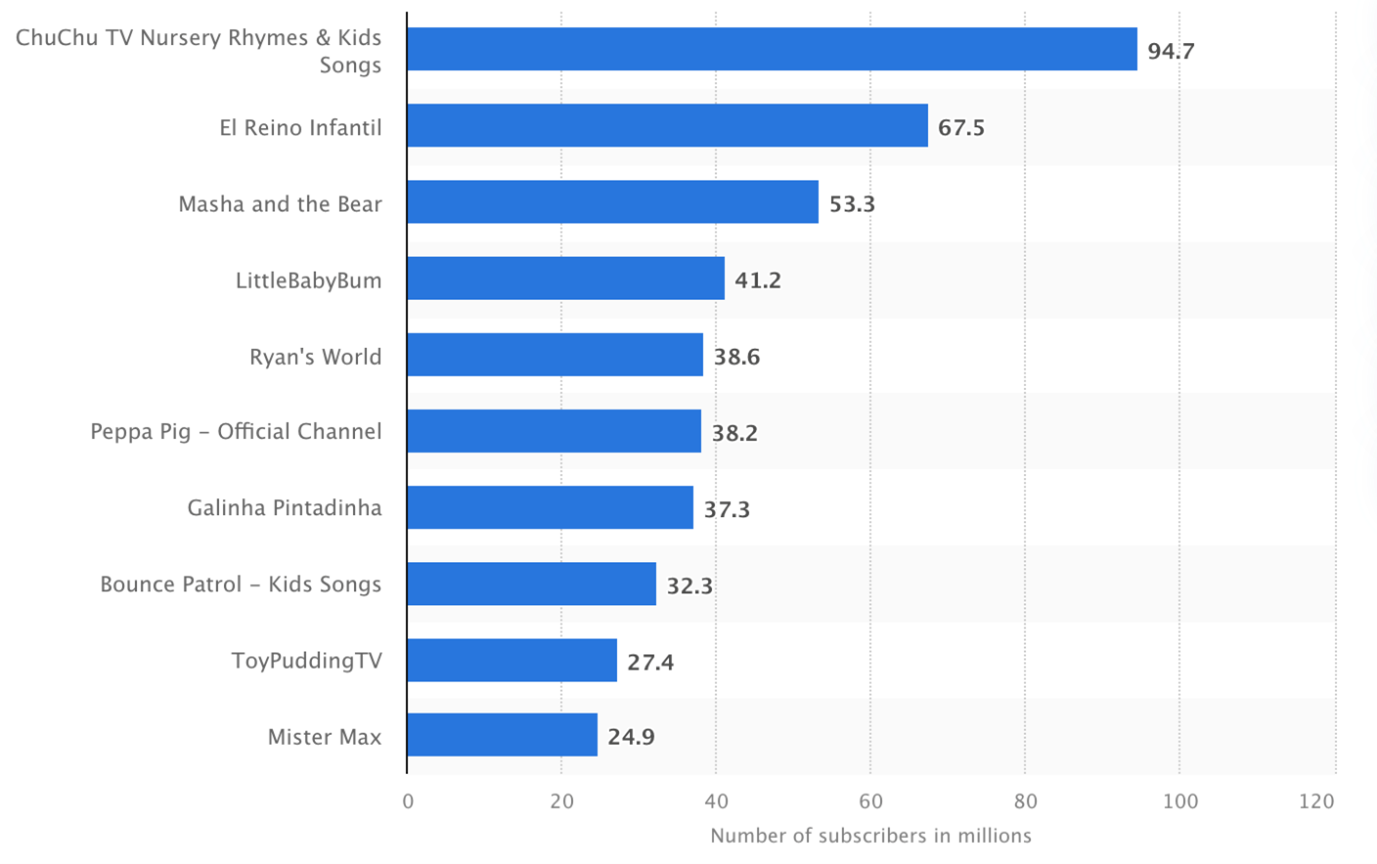
Source: Statista
Add an extra layer of protection with ESET HOME Security Ultimate
ESET HOME Security Ultimate offers a simple way to add extra safety to your child’s online world. You can set age-based profiles, block unsuitable websites or entire categories, and keep scammy or risky pages out of reach. It works quietly in the background, supporting the healthy digital habits you build together.
Conclusion
Keeping your child safe on YouTube isn’t about limiting their curiosity, but about giving them the structure and confidence to explore it wisely. By combining honest conversations, age-appropriate tools like YouTube Kids or supervised accounts and thoughtful personalization of what they watch, you can create an environment where your child feels guided rather than restricted. These small, consistent steps teach children to recognize risks, make informed choices and speak up when something feels wrong.
Frequently asked questions
Is YouTube safe for children?
YouTube can be both helpful and risky. There is a lot of high-quality educational and entertainment content, but also videos that are too mature, misleading or harmful for kids. Safety depends on how your child uses the platform: which tools you enable (YouTube Kids, supervised accounts, Restricted Mode), how closely you supervise their viewing, and how openly you talk about what they watch.
At what age can my child use regular YouTube?
In most countries, children must be at least 13 to have their own standard YouTube account. Younger children are expected to use YouTube Kids or a supervised experience managed by a parent. Even after 13, it’s a good idea to keep some level of oversight, agree on rules together, and check in regularly about what your child is seeing.
Do we really need YouTube Kids if my child is careful?
YouTube Kids’ filtering isn’t perfect, but it does provide a more controlled environment for younger viewers. It offers age-based profiles, optional search blocking and easier control over what appears on the home screen. If your child is still in primary school and uses YouTube mainly for cartoons, songs or simple learning videos, YouTube Kids is often a safer starting point than the main app.
What should I do if my child sees something upsetting or inappropriate?
First, stay calm and listen to what happened. Ask your child to show you the video, comment or channel if possible. Then you can block the channel, report the video and adjust settings - for example tightening content levels or turning off search. Most importantly, reassure your child that they did the right thing by telling you, and talk together about how to respond if something similar appears again.
How can I reduce the risk from YouTube Shorts and endless recommendations?
Shorts and autoplay can make it very easy to lose track of time and stumble into unexpected content. You can limit this by encouraging your child to start with playlists or trusted channels, turning off autoplay, tightening content settings, and setting clear time limits for YouTube use. For younger kids, using YouTube Kids with search disabled is often a better option than letting them swipe through Shorts on the main app.