In the online world, trust is a currency that cybercriminals love getting their hands on. It’s why the likes of Microsoft, Google, and Apple regularly top the list of most-impersonated brands. It’s also why a growing number of malicious actors are looking to abuse the trust that users have in Docusign.
With over a billion users worldwide, the now ubiquitous document-signing service has exactly the kind of reach that makes phishing campaigns effective. And increasingly, the tech vendor’s own infrastructure is being hijacked to bypass traditional security filters. If your business relies on sender trust alone to tackle incoming threats, it may already be exposed.
Read on to learn how Docusign email scams work today, how to verify messages safely, and how you can stop attacks before they take a financial toll on your company.
What are Docusign phishing emails for?
Docusign email scams can vary in quality and sophistication. But they have a limited set of goals. It’s usually one of the following:
- Steal email or single sign-on (SSO) credentials (e.g. Microsoft 365, Google Workspace, Okta)
- Trick users into unwittingly installing malware (i.e. infostealers or remote access trojans)
- Trick business owners or finance employees into approving fraudulent invoices or Automated Clearing House transfers
- Gain persistent access via Open Authentication app (OAuth) consent
Why Docusign emails are harder to trust in 2026
The most basic variant of these threats is a legitimate-looking Docusign email featuring a malicious link in the body of the message, which you are urged to follow in order to sign or view business documents. You will then be taken to a phishing page designed to harvest your details or install malware on your device/PC.
However, there are more sophisticated versions, including:
OAuth consent phishing: Here, instead of a phishing page, the link takes you to a legitimate Microsoft or Google sign-in page asking you to grant permissions to a third-party app (often called something like "DocuSign Secure Integration" or "DocuSign Signature Service"). Accepting will enable the threat actor to retrieve an OAuth Token, meaning they can log into that service as you without requiring your password or MFA code.
QR code phishing (quishing): A Docusign-branded phishing email contains an attachment (typically a PDF) featuring a QR code which you are urged to scan. Doing so with your phone may mean transferring to a less-secure interface where the end goal may be credential harvesting or malware installation.
Abuse of legitimate Docusign infrastructure: Attackers typically compromise legitimate Docusign user accounts and use the Docusign Envelopes API to send malicious documents containing malware, phishing links, or fraudulent invoices. Because the email has been sent via Docusign’s servers, it will bypass your DMARC, SPF, and DKIM email authentication checks.
The quickest way to verify a Docusign email
If you’re unsure whether a Docusign email is legitimate or not, do not click on anything in the message. Instead:
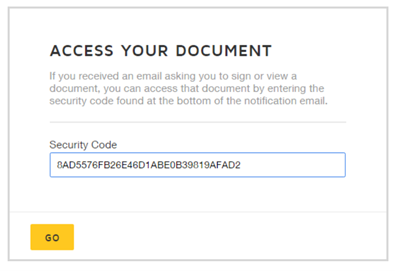
- Open your browser manually
- Go directly to Docusign.com
- Click "Access Documents"
- Paste the 32-character security code from the email
If the document loads, the email is legitimate. If no document is found, it is fraudulent. No redirects. No guesswork. No risk.
Ten tell-tale signs your Docusign email is a scam
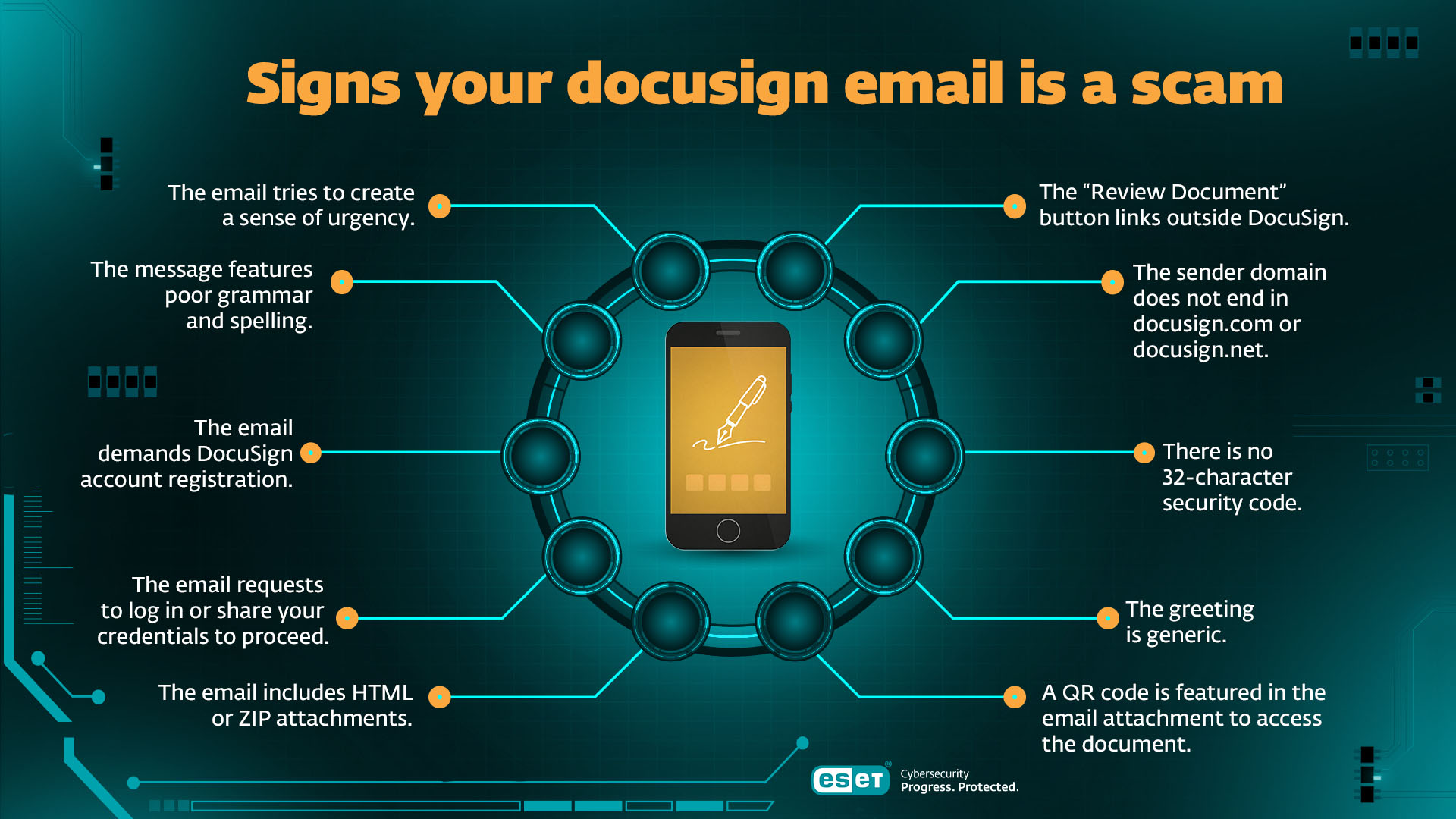
A Docusign email is almost certainly malicious if any of the following are true:
- The “Review Document” button links outside Docusign. Legitimate links should resolve only to docusign.com or docusign.net. Fake emails often redirect through compromised domains, URL shorteners, and third-party services.
- The sender domain does not end in docusign.com or docusign.net (although they can be customized to something like “agreements@docusign.yourcompany.com").
- There is no 32-character security code. All real Docusign emails include this unique verification code.
- The greeting is generic. Real messages use the recipient’s account name. “Dear Customer” or “Hello User” should be a red flag.
- A QR code is featured in the email attachment to access the document.
- The email includes HTML or ZIP attachments. Docusign does not send documents as HTML attachments.
- The email requests that you log in or share your credentials to proceed.
- The email demands Docusign account registration or similar to proceed.
- The message features poor grammar and spelling.
- The email tries to create a sense of urgency (i.e. a legal threat) to rush you into making a rash decision.
Credential theft, OAuth abuse, and invoice fraud
Threat actors could use Docusign phishing techniques (e.g. credential harvesting, OAuth consent) to access your email account. This access can then be used to monitor your inbox for invoices and payment approvals.
They could then send a convincing invoice request impersonating a legitimate supplier. Or use your email account to launch phishing/BEC attacks on your colleagues or business partners. Remember: Docusign is not a payment processor. Any request for payment or banking changes must be verified through known vendor portals or out-of-band confirmation.
How the scammers are evading detection
Today’s phishing actors use a range of sophisticated techniques to hide from security tools and make their campaigns more effective. These include:
- Hosting infrastructure on trusted platforms (e.g., cloud services, CDNs)
- Using multi-stage redirect chains to evade scanners
- CAPTCHA walls to block automated analysis
- Fingerprinting scripts to silently profile your device and tailor malicious payloads for maximum effect
- Pixel-perfect Microsoft or Google login clones
What to do if you click on a fake Docusign email
In the event of a worst-case scenario, speed matters. Act fast to minimize risk.
For individuals:
- Change your email and Docusign passwords immediately, and if you reuse the same credentials on other sites, change those too
- Enable multi-factor authentication (MFA)
- Scan the device/PC for malware
- Notify any impacted contacts, suppliers, or employers
- If you’ve shared your financial/card details, monitor your bank accounts and consider freezing your credit/cancelling your cards
For businesses:
- Reset credentials for affected users and revoke active sessions
- Revoke OAuth app access if relevant
- Run a malware scan on the affected device and isolate it from the network to contain the reach of a possible infection. If possible, run a malware scan on all your devices.
- Review mailbox rules and audit logs
- Investigate possible lateral movement or invoice tampering
- Monitor the dark web for signs of corporate information theft/leakage
- Update staff security awareness training
How your business can stop Docusign scams
To effectively mitigate Docusign threats, you’ll need more than sender filtering. Consider enforcing your security posture with:
- MFA across email and Docusign accounts
- URL sandboxing and click-time analysis
- Attachment detonation and HTML smuggling detection
- QR-codes discussed via awareness training
- OAuth consent monitoring
- DMARC set to reject, not monitor
- Updated awareness training that features current Docusign phishing simulations, including quishing
- Updated policies requiring users not to open attachments or follow links in any unsolicited emails, and only access Docusign docs via the security code
Protect what matters - your business and your home
Phishing scams and online threats don’t stop at the office. While ESET Small Business Security keeps your business safe, ESET HOME Security Ultimate protects your family and personal life.
- Advanced phishing and malware protection
- Identity and privacy safeguards
- Easy-to-manage security for all your devices

ESET Expert tips & insights
“DocuSign, even more than other well-known business software solutions, is an obvious target for cybercriminals because of the data it handles — contracts, business agreements, and other highly sensitive documents. By mimicking a brand trusted by millions of companies, and most Fortune 500 companies, attackers try to gain victims' trust and increase their success rate. According to ESET telemetry, the end of 2025 saw a sharp uptick in HTML/Phishing.DocuSign detections – a 250% increase compared with the first half of the year. Zooming out further, the quality of fraudulent messages masked as DocuSign has also improved over the last few years, with many polished enough that even careful users may struggle to distinguish them from legitimate ones. This makes multi-layered email security measures – including perimeter, server, network-wide, and endpoint solutions, as well as user awareness trainings – crucial for effective defense.”
- Ondrej Kubovič, Security Awareness Specialist
Protecting TRUST with awareness
Docusign has become the de facto standard for document signing. But ubiquity makes it a popular target for scammers. They’re using increasingly sophisticated techniques to trick you into handing over credentials, providing MFA-resistant access, paying fraudulent invoices, and installing malware. Some even use legitimate Docusign accounts to do their dirty work.
That’s why individuals and businesses need a more sophisticated response. User awareness is important. But so are updated policies, tighter DMARC controls, improved monitoring, and click-time analysis.
If you rely on sender trust alone to mitigate Docusign risks, you may already be compromised.
Frequently asked questions
What is the main goal of Docusign phishing emails?
These scams typically aim to steal your credentials for services like Microsoft 365 or Google Workspace, trick you into installing malware, or deceive finance teams into paying fraudulent invoices.
Why is Docusign such a popular target for cybercriminals?
With over a billion users, it is a globally trusted brand. Attackers capitalize on this familiarity and trust.
Can a genuine Docusign email come from any address?
No. While companies can customize certain parts of the email, legitimate Docusign notifications always originate from the @docusign.com or @docusign.net domains. Any email from a generic address like Gmail or an unfamiliar domain is a scam.
Does Docusign ever send documents as attachments?
Never for the purpose of signing. Real Docusign emails use an embedded "Review Document" button that links directly to its secure site.
What’s the quickest and safest way to verify a document without clicking the email link?
Manually go to www.docusign.com in your browser. Click "Access Documents" at the top of the page. Paste the 32-character security code from the email. If the document doesn't load there, the email is fraudulent.
If an email comes from a genuine Docusign account, can I trust it?
Not necessarily. Cybercriminals often compromise real Docusign accounts to send phishing emails which can bypass your security checks.
What should I do if I accidentally clicked a link or shared my password?
Act immediately to change your email and Docusign passwords, enable MFA, and run a full malware scan on your computer. You may also need to run more detailed forensics to hunt for signs of wider infection.