
Visit a website and (especially if you’re in the European Union) you’re likely to be hit with yet another annoying popup asking if you want to allow cookies. Most of us have done this next: just click ‘Accept’ to get to where you need to go. Yet according to research by All About Cookies1, less than 40% of people know what an internet (as opposed to a delicious, crunchy) cookie is. What’s worse: 24% just click ‘Accept’ rather than digging deeper, despite 87% noting that banner ads on websites they view seem to be quite personalized, and 90% finding that fact really quite creepy.
So, where does the cookie truth lie? Are they just useful internet files with a tasty name, or is there something more malicious hidden in their dough? Read on to find out what a cookie is, whether you should worry about them, and what to look out for that might be problematic.
Key takeaways
- Essential cookies (as opposed to third party cookies) are one of the wonders of the modern internet
- Cookies are generally harmless text files, but third-party cookies can pose a privacy risk, one reason why some browsers block them by default
- Some infostealer malware steals session cookies to bypass strong authentication, this is often targeted at corporate networks
- Legislation to force websites to offer consumers a choice on cookies is a step in the right direction – but user fatigue and some willingness by website operators to resort to Dark Patterns undermine this protection
What is a cookie, exactly?
A cookie is a tiny text file your web browser downloads to your PC, tablet or smartphone when you visit a site, helping speed up download times and personalize your (and your web browser’s) access in future visits, so that when you next go back to the same page or site, it can retrieve the cookie and personalize your experience.
Visiting a site may result in your browser collecting dozens of cookies. Some of these, issued by third parties, can be used to collect information on your preferences, habits and other behavior, which make said personalization possible.
Where the name cookie comes fromThe term ‘cookie’ in the context of computing comes from a programing shorthand for a small piece of data swapped between different computer programs as they communicate with each other. These ‘magic cookies’ were effectively unique tokens that could be swapped for information at a later date.
What are cookies used for?
- Cookies can be useful to you. For example, they can be used to store the contents of a shopping basket at an online retailer, automatically repopulate fields in web forms, and more.
- They can also be useful to others, however: Tracking cookies and Analytics cookies can be used to build a detailed picture of your browsing habits.
- In some rare cases, cookies connected with secure transactions like company logins can also be intercepted by attackers and used to log in to your accounts without your permission, which we’ll get to later on.
Cookies vs cache vs session - what's the difference?
There are three main types of data that the browser retains/exchanges with a website, as along with cookies we have cached resources and session-related state.
Firstly, a browser cache is a great way to speed up page load times. To do so, browser caches keep a hold of key data from regularly visited websites, serving the content from its own cache on the user’s own computer, rather than downloading the whole page all over again. Only data that has changed since the last visit is downloaded, boosting website performance and saving bandwidth.
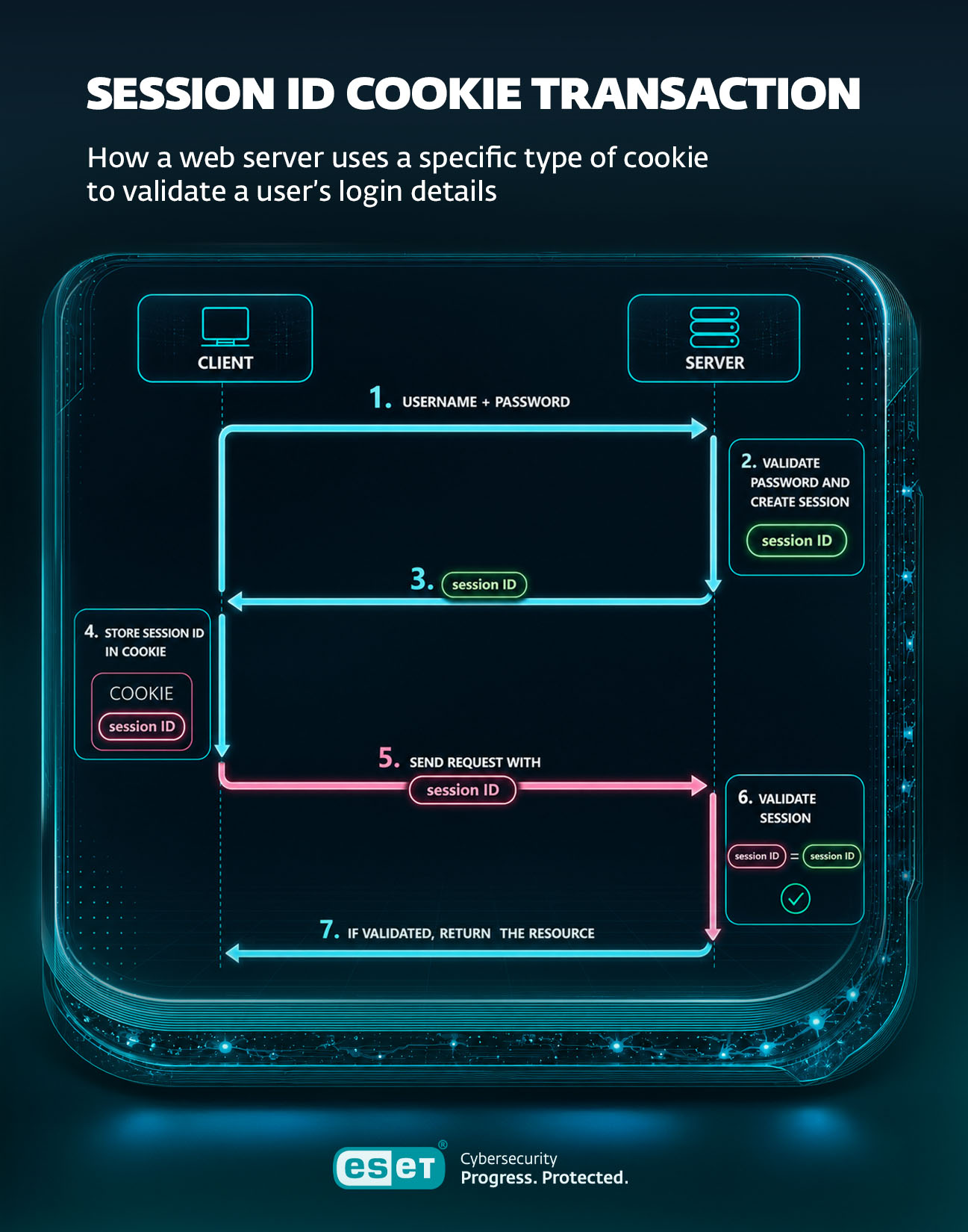
Meanwhile, session mechanisms help maintain the application state across multiple requests. In most implementations, session data - such as user-specific state or preferences - is stored on the server, while a session identifier is stored in a cookie on the user’s side. Unlike persistent cookies (more on these later), sessions usually have a limited lifetime and commonly expire after a period of inactivity or when the browser is closed, depending on how the website/browser is designed.
How do cookies work?
Understanding how Cookies work helps explain how they can help internet users like you and I, but it also shows how cookies can be problematic enough for governments in Brazil, India, the US and Europe, which have passed laws enforcing user choice and privacy.
The basics
At its most basic level, when you enter a web page’s address (such as www.eset.com) into a web browser and hit the Return key, the browser sends a request to that website to serve a page. The web server returns two things: the web page or other resource, along with a cookie (or cookies). This might be something as simple as a note of what browser you are using, so the server can send optimized pages, but it can also contain other information: the contents of forms on the website that you fill in, for example, or whether you prefer the light or dark version of the page.
One way to think of this is equivalent to the barista at your local coffee shop; when you visit, they’ll know your favorite drink and start preparing it as you walk through the door. They’ll also know that you are quite partial to carrot cake, so will be sure to mention that the one on the counter was made fresh this morning.
Another party enters the chat
Then there’s third party cookies. These may be sent by elements of the page that are stored on other servers: images or videos, functionality like chat, or advertisements. These are more concerning from a privacy perspective. To extend the analogy: you might see more ads for rival coffee shops, or perhaps, based on your apparent love of carrot cake, an ad for a weight loss program. When you notice this, it might feel a bit creepy, or perhaps downright insulting if you only have one slice of cake a week in your favorite cafe as a treat.
When you find that your health or life insurance premium has gone up due to a mistaken assumption that you’re overcaffeinated and overweight, you might start to get quite angry.
The different types of cookies
Different cookies do different jobs and come from different places. However, they all have one thing in common, they exist (mostly) on your end of things. But for how long, and how essential they are, well, that depends.
Let’s elaborate on a few different cookie types, shall we?
Session vs Persistent cookies
First off, a session cookie only exists during one session on a website. You go to the address, get the information or interaction you need, and then log off or close the browser tab. The cookie disappears in a puff of virtual smoke, leaving no record. Well – almost. Most browsers have a function called Restore Session that reloads any open tabs if the browser (or computer) crashes, or if the browser goes through a software update.
However, persistent cookies stick around: they’re stored on your device after you end a session, usually for a set period of time. This is helpful if you go back to the same site time and again, for example, to check the news or weather in your area, but they can get quite bloated after a while, and can store sensitive information like credentials or other personal information.
Perhaps of more concern: persistent cookies are used by web sites, advertisers and data brokers to track your browsing habits over time, and serve you targeted advertising.
First-party vs third-party cookies
This is perhaps obvious, but first-party cookies originate from the website you are visiting and are often used to personalize your experience on that site.
But they’re not alone, as these sites can also host third-party cookies, which are more likely to be used to map your behavior for commercial gain across as much of your internet use as possible. The data these cookies collect can be gathered and sold by data brokers to advertisers and other groups.
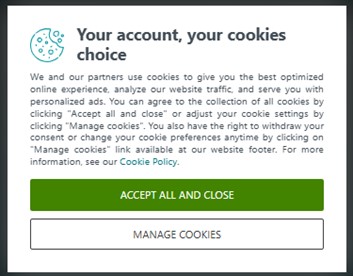
A typical cookie banner
For this reason, many countries now require websites to give audiences the right to opt out of third-party cookie usage. Some websites obey the letter of the law but not the spirit, employing dark patterns to make opting out of third-party cookies almost impossible. Others now offer two options: opt in to third-party cookie usage or pay a small fee for cookie- or sometimes ad-free access to their content or service.
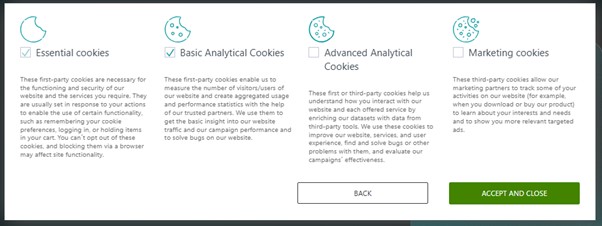
A simple, yet effective way to opt out of cookie types on eset.com
Essential Cookies
Essential cookies are those first-party cookies we talked about earlier: they’re set by the site you’re visiting, and they fall into several groups:
- Session-id: If you’ve filled in a form or other input, then closed down the page, a session-id cookie will retain the information on your computer should you go back. The most obvious example: the shopping basket on an e-commerce site
- Authentication: Identifies you through your login credentials, confirming and recalling your account information, depending on security settings
- Load balancing: A user-side load balancing cookie helps a site with multiple servers prioritize routing traffic from the best server to your device. This helps avoid slowing down the user experience (among other things) when there’s a lot of traffic. A classic example is buying tickets for a popular live event over the internet
- User-centric security: These cookies help spot potentially fraudulent attempts to log in to your account
User-led consent cookies
Some cookies are intended to improve your experience by storing settings and preferences. These often require your consent.
- User interface customization, AKA preference or functionality cookies store things like language, location or regular form fill data, or user interface settings like Dark Mode.
- Multimedia cookies are session cookies that take note of things like network speed, buffering and resolution for media playback. The intention is to provide the best possible audio and video experience for users, even if the network or user device is not the best.
Non-essential cookies
This type of cookie certainly does demand your consent, and they’re probably the most problematic for most people (as well as for lawmakers, who we’ll get to shortly). They need user consent in order to be downloaded and stored on your computer.
- Advertising Cookies enable customized adverts to be served to web users based on the websites they go to.
- Social network tracking is closely related to the function of advertising cookies. These cookies are used by companies such as Meta, X (formerly Twitter) and LinkedIn to build a picture of user behavior and interactions.
- Analytics cookies are used by marketing teams to track customer and prospect conversion, and to identify patterns of behavior in their audiences.
A quick note on zombie cookies, supercookies, and Flash cookiesWhile most sites that serve cookies do so in a way that allows them to be removed, others serve up zombie cookies. These are often stored by the user’s browsers in multiple locations, making them difficult to remove to wipe behavior and other data.Supercookies are similar in nature, but instead of finding a place to hide out in your device’s storage, they are stored on an ISP’s servers and look for the unique identifiers of your devices when they connect to the web pages in questionFlash cookies are also known as LSOs (Locally-Shared Objects) aren’t technically cookies, although they do bear some similarity. Named after Macromedia’s Flash multimedia player, now owned by Adobe. These can be helpful for people playing in-browser games that use Flash, but they’re more often used to track users, and as a result tend to be viewed quite negatively, since if the LSO was under 100kb in size, users weren’t alerted to their presence or setting. In the past, it was necessary to go to Adobe’s website to disable this capability – which would involve downloading a Locally Shared Object in the process. Nowadays, browsers default to blocking Flash, so users have to actively choose to use Flash.
Are cookies dangerous? The real risks in 2026
In all honesty, it’s one thing worrying about advertisers building profiles on you so accurate it feels like they’re looking into your head, but another to consider data theft and worse via infostealer malware.
Having said that, cookies can’t carry malware, nor viruses. They’re plain text files rather than executables. If you receive a cookie from a server, it’s actually fairly easy to find it and open it in a plain text editor to look at the contents.
Session hijacking - why stolen cookies start to matter more than stolen passwords
While they can’t carry malicious content, would-be attackers can turn to a tactic called ‘caller session hijacking’ instead, to steal the session key between your device and the server after you’ve gone through the process of authenticating your login (via a cookie).
Recent tools to achieve this, such as LummaC2 and Storm, are infostealer malware capable of harvesting all kinds of confidential data, including session-id cookies.
A report by Constella in 2026 showed the scale of this problem, which at present is focused on the authentication process for business users. In 2025 the company processed 51.7million infostealer packages, a 72% year-on-year increase that included the harvesting of entire digital user personas, including live session cookies, system metadata, and autofill data from web sessions.
There are some straightforward steps you can take to avoid this issue: Keep your web browsers up to date, invest in good antivirus protection, and be careful what you download and from where.
What Chrome's new DBSC protection (April 2026) changes
In April 2026, Google released a fresh version of its Chrome browser, initially in Windows, that addressed the problem represented by LummaC2, Storm and other infostealers. Chrome 146 hardware-binds session cookies, so duplicates stolen by these tools are effectively useless.
However, this release doesn’t protect devices that aren’t running modern versions of Windows, nor will it tackle existing infections.
Should you accept cookies? A decision framework
There’s no clear yes or no answer to this question, simply because some cookies are incredibly helpful. Consider accepting third-party cookies on a website you are familiar and comfortable with and ensure you are connected to the site using HTTPS rather than HTTP first. Also factor in how sensitive the data you give to the website is, and reconsider accepting third-party cookies if you feel uncomfortable.
When should you reject or customize?
Consider the value-to-risk balance when working with cookies. If you’re visiting an unfamiliar site or using public Wi-Fi without a strong VPN in place, or if you’re entering confidential data, denying third party cookies is a sensible option. If your browser or ESET products sound the alarm, that’s a signal to shut things down.
What happens if you don't accept cookies?
You’re unlikely to be prevented from going about your day, but your user experience might not be perfect online. In fact, in the EU, it’s illegal to refuse to serve a web page if users deny cookies. That said, some capabilities or features on your regular websites, such as automatic formfilling or dynamic checkout baskets, may not work at all, or may be interrupted. In short, the website might not remember you from your last visit; the result will be your using more effort to navigate.
Why "Reject All" isn't always more private
A finding reported in the 2023 NeurIPS proceedings described how users who turn down cookies may inadvertently share more data than if they’d simply accepted them. This is, in part, because certain demographics routinely deny cookies, and this can be turned into a signal for analysis.
Should you delete cookies, and how often?
There’s not hard and fast rules on when deleting cookies on your device is helpful, so our best advice is to either set a calendar marker to clear cookies on an occasional basis or, if you’re particularly security conscious, dig through the settings on your browser to automatically delete cookies at the end of each session.
You can find out how to do this by clicking on the browser names below. Note this was last verified in April 2026:
Five common Cookie myths
Myth Fact Cookies can give your PC a virus Cookies are text files, not executables. They can be intercepted and stolen, however, and put to use by attackers Third-party cookies are on the way out No. Google was planning on doing this with Chrome, but dropped the idea in 2025. That said, Safari and Firefox, which make up a huge chunk of internet web browsing, already block third-party cookies – usually, but not entirely – by default Clicking ‘Reject all’ is the safest choice Lack of a signal can be a signal in itself, as the NeurIPS report shows Cookies store your passwords Nope. They can store your session identifier, which is effectively worthless to an attacker Deleting cookies will destroy the internet Sorry, but that’s hokum. At worst, you’ll have to log back into your favorite websites again
The regulatory context - GDPR, CCPA, and why banners exist
We’ve talked about lawmakers obliging websites to display these accept/deny cookies popups, and as annoying as they can be, there is good reason for this activity. Leading the way is the EU’s GDPR (General Data Protection Regulation), which governs all kinds of data and information sharing.
In the US, you’ll want to look up the California Consumer Privacy Act, but also be aware that rulings vary from state to state, complicating the situation for consumers. India has the Digital Personal Data Protection rules, while Brazil is also looking out for user privacy with the LGPD, or General Data Protection Law.
Protect your browser from tracking and session abuseCookies, browser tracking and stolen sessions affect both individuals and small businesses.ESET Browser Privacy & Security, included in ESET HOME Security Ultimate and ESET Small Business Security, helps reduce invasive tracking and protect both browser sessions and online identities.

ESET expert insight
“Cookies have the ability to become indirectly dangerous, and they’ve quietly become one of the most valuable targets for attackers due to the fact they represent a user who’s already been verified and trusted. This, therefore, acts as the perfect cover to attack. Instead of trying to crack passwords or phish users for login details, criminals are increasingly skipping that step entirely by stealing session cookies that let them walk straight into accounts without needing to log in at all. This also means traditional protections like multi-factor authentication can be easily bypassed. To make matters worse, infostealer malware harvests browser data to sell these sessions as cookies, now offering a faster and often more reliable route in than credentials ever did.To protect against such attacks, it’s vital to keep devices updated, avoid any suspicious downloads and try not to stay logged in on machines that might be shared.”
- Jake Moore, Global Security Advisor
Conclusion
In 2026 Cookies remain both indispensable to web browsing and a continuing privacy threat. Lawmakers have tried to legislate around the issues, but this has led some users to ignore the controls put in place and encourage both data brokers and marketers to ever-more complex schemes to profile each and every one of us. Don’t worry - but do be informed.
Additional references:
1) 1) All About Cookies. (2026, April 30). *Internet cookies survey: What Americans know and don’t know about cookies*. https://allaboutcookies.org/internet-cookies-survey. Accessed: 06.05.2025
Frequently asked questions
Are cookies safe?
They’re simple text files, so they can’t install software on your PC. What is possible is that attackers may be able to steal session cookies using malware or a leaky connection.
What happens if I don't accept cookies?
The site may not remember your login, preferences, or shopping cart contents. Some features, like automated logins, just won't work. Essential cookies still function regardless of your choice. In the EU, sites are not allowed to lock you out completely for refusing non-essential cookies, though some make the workflow deliberately annoying. Lately, there’s also been an option to pay a token fee for access instead.
Should I delete my cookies?
Deleting your cookies every now and then certainly doesn’t hurt. In Firefox, for example, you can do this by navigating to its Settings > Privacy & Security > scroll down and find the Cookies and Site Data section > click the Clear Data button. That’s all it takes. For session cookies, it might be enough just to close the browser!
Are third-party cookies being phased out?
Not in Chrome as of 2026. Google reversed that plan in April 2025 and it now lets users manage third-party cookies through Chrome’s existing privacy settings. Other browsers, like Safari and Firefox, block third-party cookies by default, which means roughly half the web is already largely cookieless in practice.
How long do cookies stay on my computer?
It depends. Session cookies (should) vanish the moment you close the browser. Persistent cookies carry an expiration date set by the site: anything from minutes to years. Most consumer cookies expire within a few weeks to a year. Zombie cookies stay forever, unless you know where to look and what to delete.