A quick answer: A phone may be tracked through location-sharing settings, apps with excessive permissions, spyware, web tracking, mobile networks or a hidden Bluetooth tracker. Warning signs can include unusual battery or data use, unknown apps, unexpected location sharing and unfamiliar devices connected to your account. No single sign proves tracking, so review several indicators before taking action.
Key points of the article:
- Phone tracking can occur through multiple methods, including location-sharing features, compromised Apple or Google accounts, spyware or stalkerware, web tracking technologies, mobile networks, and hidden Bluetooth trackers such as AirTags.
- Common warning signs include unusual battery drain, high data usage, unfamiliar apps, unexpected changes to settings, unknown devices connected to your accounts, and alerts about unknown Bluetooth trackers.
- Checking for tracking requires reviewing account access, location-sharing settings, app permissions, installed applications, and security indicators on both Android and iPhone devices.
- Reducing tracking risks involves securing accounts with strong passwords and MFA, keeping devices updated, reviewing permissions regularly, avoiding suspicious apps and phishing attempts, and using reputable mobile security software.
We carry our smartphones around at all times, so if someone knows their location, they know where we are. That’s not to mention all the personal and financial data we store and access on these devices; including logins to all of our online accounts. No one wants these to fall into the wrong hands.
There’s also a privacy risk from the large volumes of location and web browsing data that advertisers, social media companies and others collect via our devices. As the US government warned in 2022: “Businesses collect, use, and sell consumer data. But consumers may be unaware of how it's being collected and used and generally aren't able to stop its collection or verify its accuracy.”
By better understanding these risks, you can take steps to start minimizing them.
Can someone track your phone without you knowing?
Tracking can happen through several different mechanisms, and understanding the distinction between them is important because each works in a different way and requires different defenses:
Consensual or forgotten location sharing
Many devices and apps include location-sharing features that users intentionally enable for family, friends, or colleagues. In some cases, people forget that sharing remains active long after it is needed, allowing others to continue viewing their location without realizing it.
Apps and account access
Someone with access to an online account, shared credentials, or a device can often view location history, activity logs, messages, or other data. Cloud services, family-sharing platforms, and connected apps can reveal a person’s whereabouts even without specialized tracking software.
Spyware or stalkerware
Spyware is software installed on a device to secretly monitor activity. Depending on its capabilities, it may collect location data, messages, call logs, photos, browsing history, or other sensitive information and transmit it to a third party without the user’s knowledge.
Stalkerware is a specific type of spyware designed to monitor an individual, often an intimate partner, family member, or acquaintance, without their informed consent.
Web and advertising tracking
Websites, apps, advertisers, and data brokers can collect information about users through cookies, device identifiers, tracking pixels, and other technologies. While this tracking is usually intended for analytics or targeted advertising, it can also create detailed profiles of a person’s movements, interests, and online behavior.
Cell towers and IMSI catchers
Mobile phones regularly communicate with nearby cellular towers, allowing network operators to estimate a device’s location. More advanced techniques can involve IMSI catchers (IMSI stands for international mobile subscriber identity), which are devices that imitate legitimate cell towers and can be used to identify or track nearby mobile phones under certain circumstances.
AirTags and other Bluetooth trackers
Small Bluetooth tracking devices, such as AirTags and similar products, are designed to help owners locate personal belongings. However, if concealed in a vehicle, bag, or personal item, they may be misused to track an individual’s movements. Modern devices often provide alerts when an unknown tracker appears to be traveling with someone.
How can your phone be tracked?
Location sharing and apps
Perhaps the most obvious way your phone could be tracked is via GPS. Many applications use this feature to monitor your location - ostensibly to improve the service they deliver. But what’s appropriate for a maps app may seem like overreach for, say, a game. And, malicious or suspicious apps could abuse these features to track your movements. Also, legitimate app developers could be breached, compromising historic location data.
Spyware and malware
Malicious software installed on your device designed to monitor activities, including location tracking, is generally referred to as “spyware”. It exploits device vulnerabilities in order to function and is designed to operate covertly. Spyware could do anything from keylogging and stealing browsing info to recording audio and video, as well as taking screenshots. It could be unwittingly installed via clicking on a phishing link, visiting an infected web page (i.e. a drive by download), clicking on a malicious ad, or downloading a malicious app.
While spyware can have multiple purposes (stealing baking credentials, identity theft, etc.), stalkerware is specifically designed to secretly monitor a targeted person’s activity.
Compromised Apple or Google account
A compromised Apple ID or Google Account can allow an attacker to track a phone even if no spyware or stalkerware is installed. This is because both Apple and Google provide legitimate device-location services that are tied to the account.
Importance of identity protection
Account compromise may begin with stolen credentials obtained through phishing or a data breach. Identity Protection can help alert users when their personal information or login credentials appear in known breaches, so they can take action to secure affected accounts.
Cell tower tracking and IMSI catchers
Your mobile operator will also be able to track your approximate location by analyzing your phone’s signal strength, as received by nearby cell towers. This data could theoretically be handed to law enforcement or government agencies.
Stingrays, also known as “IMSI Catchers,” are mobile devices imitating cell towers allowing sophisticated threat actors and government agents to track location and other data from nearby phones.
Wi-Fi, IP address and web tracking
Smartphones are constantly communicating with nearby Wi-Fi networks and Bluetooth devices. Some of these may be malicious and, if you connect, will seek to track your location and spy on your device. The risk is particularly acute in built-up urban areas with a large volume of overlapping networks and nearby devices. “Legitimate” tracking by retail stores and the like is mitigated by mobile operating systems, which use randomized MAC address to hide your unique device serial number. But as EFF warns, there are exceptions.
Visit any website on your phone and you’ll be tracked by the operator of that site (first-party tracking) as well as potentially shady third parties. They do so mainly via your IP address, HTTP cookies, web beacons and Canvas, as well as browser fingerprinting, and may want to know all about your internet activity.
AirTags and other Bluetooth trackers
Physical trackers like the Apple AirTag, Tile or Samsung SmartTag use Bluetooth and ultra-wideband (UWB) technology to track devices and display their location in apps such as Apple’s Find My or Samsung’s SmartThings Find. They could theoretically be used by abusive or controlling partners to discreetly monitor your movements, if slipped into a bag or pocket.
Signs your phone is being tracked
Watch out for these warning signs that you’re under active surveillance:
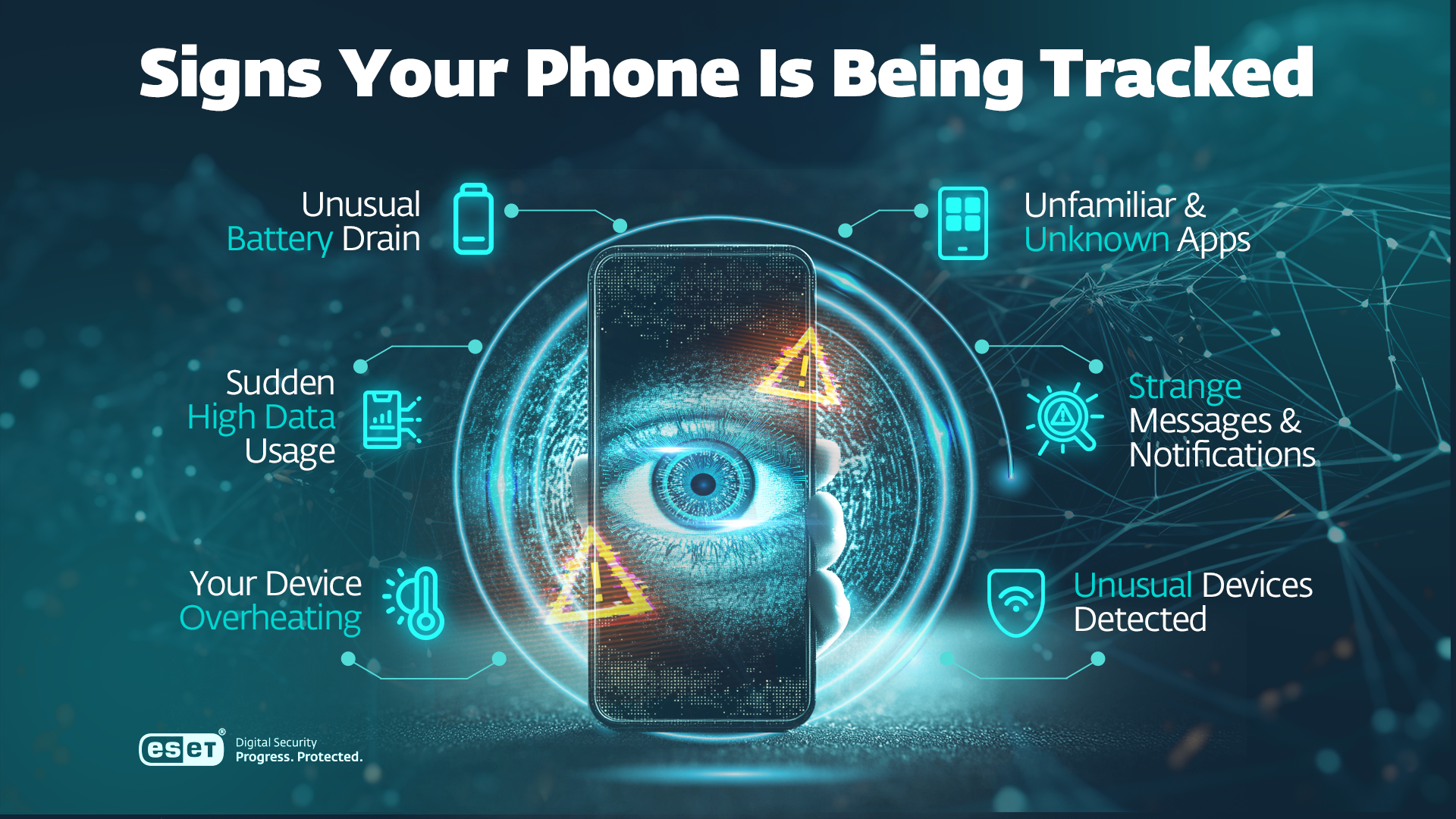
Unusual Battery Drain
If your phone's battery is running down quicker than usual, it could indicate spyware or risky apps running continuously in the background. There’s guidance on how to check for iOS and Android.
High Data Usage
Excessive and/or unexpected spikes in data consumption may indicate that some malware or unknown application is continually sending your location data to a third party. You can check for this on Android and iOS devices.
Overheating
Mobile phones do get warm through overuse. But a persistently overheating device, even when not in use, could indicate unauthorized background activity.
Legitimate causes
Keep in mind that battery drain, overheating or increased data use can have many legitimate causes. For example, long video calls or streaming sessions running with high screen brightness can effectively drain both your battery as well as data and create extra heat in the process. These signs are rather reasons to investigate than solid proof that a phone is being tracked.
Unfamiliar apps and extensive permissions
Tracking apps and/or spyware may disguise themselves as legitimate applications. It pays to take a look at your home screen once in a while to check whether or not something looks out of space.
When downloading apps, check permissions they ask for. If they do not match an app’s purpose, it’s a red flag.
Unknown devices signed in to the Apple/Google account
Unknown devices associated with an Apple ID or Google Account may indicate unauthorized account access. An attacker with account access can potentially use legitimate features such as Find My or location sharing to monitor a user’s whereabouts without installing stalkerware on the device.
Unexpected changes to settings
Unexpected changes to security, privacy, location-sharing, or account settings may result from spyware, stalkerware, or unauthorized account access. You may notice location services being enabled when you previously disabled them or new location-sharing relationships appearing in legitimate apps and services like Apple’s Family Sharing.
However, settings changes alone are not conclusive because legitimate apps, updates, and device management tools can also modify settings.
Strange messages and notifications
If your device receives unusual SMS messages containing symbols or unfamiliar numbers, it could be that spyware is attempting to communicate with a third party. It’s also worth checking to see if the camera or mic on your Android or iPhone device has been activated by an app/spyware.
Also, pay attention to location access notifications that occur frequently without a clear reason and location services being active when no navigation, weather, or delivery app is being used.
Unwanted tracker alerts
Both Android smartphones and iPhones have functionality alerting you when an unknown tracking device is separated from its owner and it is near you. Not every alert means that you are tracked, though. For example, you may get these notifications if you’re traveling with someone who has a tracker with them.
Unusual Devices
Look out for the presence of anything unusual in coat pockets or bag compartments. These small, slim physical trackers come in a variety of shapes and sizes.
How to check if your phone is being tracked
Both Android and iOS offer multiple ways to conduct a comprehensive security and privacy review of your device:
Check an Android phone
- Review all installed apps.
- Open the privacy dashboard or permission manager on your device.
- Check location, camera and microphone access.
- Review background battery and data use by app.
- Check devices signed in to your Google Account.
- Review active location sharing.
- Check device admin and accessibility access.
- Look for unknown tracker alerts.
- Run a scan with reputable mobile security software.
Check an iPhone
- Use Apple’s Safety Check feature to quickly review information sharing: Settings → Privacy & Security → Safety Check.
- Review Location Services and apps having Precise Location turned on.
- Review microphone, camera, Bluetooth and local-network access.
- Check devices signed in to the Apple Account.
- Review Find My and location sharing.
- Review profiles configuration: Check Settings → General → VPN & Device Management
- Pay attention to orange (a microphone is being used) and green (a camera or camera + microphone is being used) sensor indicators.
- Review unknown AirTag or accessory alerts.
- Update iOS and remove unknown apps.
How to block phone tracking
If you suspect someone is tracking your phone, it’s important to act methodically. Rushing to remove apps or change settings could alert the person responsible and potentially escalate the situation. The following steps can help you regain control of your device and accounts while preserving evidence if needed.
1. Consider your personal safety first
If you believe a current or former partner, family member, employer, or someone else may be tracking you, think carefully before making changes. In some situations, removing tracking access can alert the individual responsible. If you feel threatened or unsafe, consider contacting local authorities, a domestic violence support organization, or another trusted resource before taking action.
2. Stop unfamiliar location sharing
Review location-sharing settings on your device and within apps such as Find My, Google Maps, social media platforms, family safety apps, and messaging services. Disable location sharing with anyone you don’t recognize or no longer wish to share your location with.
3. Remove unknown devices from your accounts
Check the devices connected to your Apple ID, Google Account, and any other accounts that provide access to your phone data. Sign out of unfamiliar devices and remove any you don’t recognize. An unauthorized device connected to your account may provide access to location information, messages, photos, or other personal data.
4. Change passwords and enable MFA
Using a trusted device, change the passwords for your Apple, Google, email, banking, and other important accounts. Create strong, unique passwords and enable multi-factor authentication (MFA) wherever available. This can prevent attackers from regaining access even if they know your password.
5. Review app permissions
Check which apps have access to sensitive information, including your location, camera, microphone, contacts, photos, and Bluetooth. Remove permissions that are unnecessary or inconsistent with the app’s purpose.
6. Remove suspicious apps or configuration profiles
Uninstall apps you don’t recognize or no longer use. On iPhones, review installed configuration profiles and mobile device management (MDM) settings, as these may provide elevated levels of access. On Android devices, review apps with device administrator privileges and revoke access where appropriate.
7. Update your device and apps
Install the latest operating system and application updates. Security patches often address vulnerabilities that could be exploited by spyware, stalkerware, or other malicious software.
8. Run a security scan
Where supported, use reputable mobile security software to scan your device for malware, spyware, and other threats. These tools may identify potentially unwanted applications or suspicious behavior that could be linked to tracking.
To get back on the front foot against covert mobile phone trackers, try this option:
ESET Mobile Security offers award-winning protection for Android against various threats including viruses, ransomware, phishing, smishing and spyware.

9. Document evidence and seek support
If you uncover evidence of unauthorized tracking, take screenshots, record relevant details and keep notes of suspicious activity. This information may be useful if you need assistance from your device manufacturer, a security professional, law enforcement, or a victim support organization.
10. Factory-reset your phone only if necessary
A factory reset can remove many forms of malware and unwanted software, but it should generally be considered a last resort. Before resetting your device, back up important files and ensure you have access to the accounts needed to restore your phone. If the tracking is account-based rather than device-based, a reset alone may not resolve the issue.
How to prevent phone tracking
While no device can be completely immune to privacy risks, following good security practices can significantly reduce the chances of unauthorized tracking.
Use a strong screen lock and enable MFA
Protect your phone with a strong PIN, password, or biometric authentication. Multi-factor authentication adds another layer of security to your online accounts, making it more difficult for attackers to gain access even if they obtain your password.
Keep your operating system and apps updated
Regular software updates help fix security vulnerabilities and improve overall device protection. Enable automatic updates whenever possible to ensure you receive critical security patches promptly.
Review permissions and location sharing regularly
Periodically check which apps and services have access to your location and other sensitive data. Review any active location-sharing arrangements and remove access that is no longer needed.
Download apps only from official stores
Install apps from trusted sources such as Google Play and Apple’s App Store. Avoid sideloading apps or downloading software from unofficial websites, as these are more likely to distribute malicious or altered applications.
Stay alert to phishing and smishing
Cybercriminals often use fraudulent emails, text messages, and social media messages to steal credentials or trick users into installing malware. Be cautious of unexpected links, attachments, and requests for sensitive information.
Use public Wi-Fi carefully
Unsecured public Wi-Fi networks may expose your data to interception or other attacks. Avoid accessing sensitive accounts on public networks unless necessary.
Consider using a VPN
A virtual private network (VPN) can help protect your internet traffic from eavesdropping, particularly when using public Wi-Fi. While a VPN does not stop all forms of tracking, it can improve privacy and help conceal your IP address from websites and network operators.
Manage Bluetooth and nearby-sharing features
Turn off Bluetooth, AirDrop, Nearby Share, and similar features when not in use. Limiting wireless discoverability can reduce unnecessary exposure to nearby devices and potential attacks.
Use reputable mobile security software
A trusted mobile security solution can help detect malware, monitor for suspicious activity, and provide additional protection against threats targeting smartphones and tablets.
Monitor your digital identity
Exposed personal information or stolen login credentials can enable unauthorized access to Apple, Google, email, social media, and other online accounts. Identity monitoring services can alert you when your email address, passwords, or other personal data appear in known data breaches, giving you the opportunity to change compromised passwords and secure affected accounts before they are abused.
ESET Tips and Insights
“In today’s digital world, true anonymity is rare. Devices, browsers, social media and apps collect trackable information. However, your phone typically isn’t “listening” to every word—metadata from your online behavior alone creates a detailed profile that often reveals more than your private conversations. And even your family and friends’ data helps shape ads. For instance, you are shown lawn mower ads because your father is searching for one and you might consider it as a gift; while you talked about it, no eavesdropping was needed to craft and target the ad. It just means that modern tracking extends beyond a single device, reflecting the entire digital network around us.
While mobile devices are generally secure, user behavior remains an important factor in limiting tracking risks. Practicing basic cyber hygiene helps avoid the common pitfalls, but scheduling an automated restart every week or even every day can help remove hidden malicious code installed without user’s knowledge. High-risk individuals — potentially targeted by commercial spyware such as Pegasus or Predator — may benefit from iOS Lockdown Mode or Graphene OS on Android. Alternatively, they can leave all internet-enabled devices in secure storage during sensitive meetings. If doing so, they should always inform someone of their whereabouts.”
- Ondrej Kubovič, Security Awareness Specialist
Frequently Asked Questions
How can I tell if my phone is being tracked?
No single symptom proves your phone is being tracked, but several warning signs together may justify a closer look. These include unusual battery drain, unexpectedly high data usage, persistent overheating, unfamiliar apps, changes to location-sharing settings, unknown devices connected to your Apple or Google account, and alerts about unknown Bluetooth trackers traveling with you.
Can someone track my phone if Location Services are off?
Yes. Disabling Location Services can prevent many apps from accessing GPS data, but it does not eliminate all tracking methods. Someone may still track you through compromised Apple or Google accounts, active location sharing in specific services, Bluetooth trackers, cellular network data, Wi-Fi connections, or web-based tracking technologies.
How can I check whether someone is tracking my iPhone?
Start by using Apple’s Safety Check feature to review information and location sharing. Then check Location Services permissions, Find My settings, connected devices on your Apple Account, installed apps, and any profiles listed under VPN & Device Management. Also review alerts for unknown AirTags or Bluetooth accessories moving with you.
How can I check an Android phone for tracking software?
Review all installed apps and remove anything unfamiliar. Check app permissions for location, camera, microphone, and accessibility access. Examine battery and data usage for unusual activity, review devices signed in to your Google Account, inspect active location sharing, and run a scan using reputable mobile security software.
Can someone track my phone through Wi-Fi or Bluetooth?
Potentially. Wi-Fi networks and Bluetooth connections can reveal information about nearby devices and location. Malicious hotspots or hidden Bluetooth trackers may be used to monitor movements in some situations. Although modern mobile operating systems include privacy protections, it is still a good idea to disable Bluetooth and nearby-sharing features when they are not needed.
Does a VPN stop someone from tracking my phone?
A VPN helps protect your internet traffic and hides your IP address from websites, internet providers, and people monitoring network traffic. However, it does not prevent all forms of phone tracking. A VPN cannot stop tracking caused by spyware, compromised accounts, active location sharing, or physical Bluetooth trackers such as AirTags.
Will a factory reset stop phone tracking?
A factory reset can remove many forms of spyware, malware, and unwanted applications from a phone. However, it is not a guaranteed fix for every tracking scenario. If someone has access to your Apple, Google, email, or other online accounts, they may still be able to track information after the reset unless those accounts are secured.
Can an AirTag be used to track me?
Yes. AirTags and similar Bluetooth trackers are designed to help locate personal belongings, but they can be misused if hidden in a vehicle, bag, or other personal item. Fortunately, both Android and iPhone devices can alert users when an unknown tracker appears to be traveling with them over time.
Can someone track my phone through my Apple or Google account?
Yes. If an attacker gains access to your Apple ID or Google Account, they may be able to use legitimate services such as Find My, location sharing, device management tools, or account activity data to monitor your whereabouts. This is why strong passwords, MFA, and monitoring for compromised credentials are so important.