ESET X WEWORK OFFER: SAVE UP TO 20% ON ESET HOME DIGITAL SECURITY 3-YEAR LICENSE
MOST POPULAR
TOTAL PROTECTION
Elevate your protection with Password Manager, encryption for sensitive files and cutting-edge threat detection.
- 24/7 real-time protection
- Fast scans with no interruptions
- Always-on payment and privacy protection
- Safe smartphones, tablets and webcams
- Secures your logins and passwords
- Shields your sensitive data and photos
Worry-free payments and privacy protection with features such as anti-phishing and Wi-Fi protection.
- 24/7 real-time protection
- Fast scans with no interruptions
- Always-on payment and privacy protection
- Safe smartphones, tablets and webcams
- Secures your logins and passwords
- Shields your sensitive data and photos
Award-winning antivirus for Windows and macOS.
- 24/7 real-time protection
- Fast scans with no interruptions
- Always-on payment and privacy protection
- Safe smartphones, tablets and webcams
- Secures your logins and passwords
- Shields your sensitive files and photos
Explore all features
95%
Satisfaction score Rated in Customer satisfaction survey
8 000+ responses

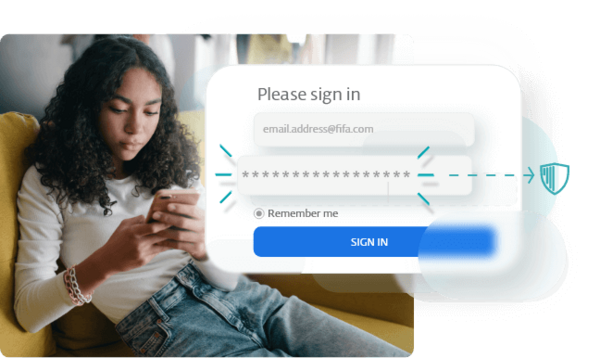
Designed for the unexpected - 24/7 protection against malware, sketchy websites and email or SMS scams.
One-click solution for family safety
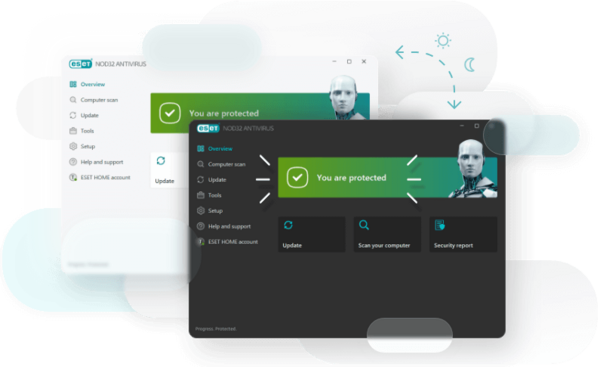
- Easy setup & license sharing Sharing protection with your family and friends has never been easier thanks to the free ESET HOME management platform.
- Quick scan accessible from all screens
- Simple household protection status view Overall protection status visible right on home screen, to keep you constantly up to speed on the security level of your household.
- Smart defaults ESET works with minimal user interaction and technical knowledge thanks to smart defaults and automatic updates.
- Automatic updates
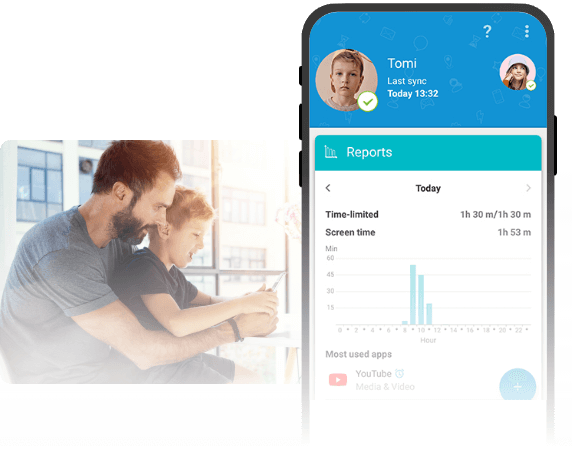
Make the internet a safe space for your children and stay in touch with their screen-time and digital footprint.
How does it work?
ESET Parental Control for Android is a family-friendly app that helps you keep your kids safe online.
- Managing their screen-time on safe kid games and apps
- Block websites and inappropriate web content
- Check kid's location using phone location tracker and setting alerts once they leave selected zones
74% of gamers have experienced harassment and cyberbullying while playing games online.
Not decided yet?
Lowest impact on resources, backed by data
Results based on Independent Tests of Anti-Virus Software
Frequently Asked Questions
How do I download/install ESET after purchase?
You can install ESET Internet Security by following these simple steps:
1. Uninstall any previously installed antivirus software on your system.
2. Download the ESET installer file here.
3. Double-click the installer file to begin the installation and follow the on-screen instructions.
4. Activate your protection by logging in to, or creating, your ESET HOME Account, or by inserting your unique license key.
More details about product installation and activation can be found here.
Can I protect mobile phones or multiple operating systems with ESET licence?
Yes, ESET Internet Security (ADVANCED) and ESET Smart Security Premium (PREMIUM) are multi-platform solutions. You can secure all your Windows, macOS and Android devices with this licence – just select how many devices you wish to protect and enjoy ESET protection.
ESET NOD32 Antivirus (ESSENTIAL) can secure only desktop and notebook computers running Windows or macOS.
Can ESET protect my iPhone or iPad?
ESET offers protection for Macs, Windows PCs and Android mobile devices. Currently, ESET does not provide a security solution for iOS but can offer lots of advice on keeping your Apple mobile devices secured; read more about how to protect your iPhone and iPad.
Can I try ESET before buying?
Yes, a free 30-day trial can be downloaded here.
What do users appreciate about ESET?
Verified customers appreciate that ESET is:
- Light on their system
- Reliable and effective
- Able to run smoothly in the background, without interruptions
"Works perfectly and has done for years. Extremely efficient and with minimal impact on the functionality of the machine it’s installed on."
Read full reviews and more feedback on our Trustpilot page.
Why choose ESET Security instead of free antivirus software?
While we’d always recommend you have something rather than nothing, most free antivirus software won’t protect you from every single threat.
Our own free malware scanner is a great starting point, but to protect every aspect of your system from malicious software, data theft and more, you’ll need full coverage. ESET security software offers protection across multiple platforms & devices. It has anti-theft protection and security features designed to protect your financial data and personal information. Our technology also employs machine learning to help protect you from both existing and emerging threats.
Can I do a free malware or virus scan first?
Absolutely. You can download our anti-malware scanner first if you just want to run a quick check. While our free scanner does offer ongoing protection, our full internet security suite is advised for full protection.
Does ESET protect against malware like ransomware?
Yes! ESET offers full protection against all forms of malware, including ransomware, spyware, keyloggers and adware. We use machine learning to stay up-to-date with new threats too.
Pricing and Payment FAQs
Can I get a refund if I am not totally satisfied?
We are committed to our clients’ satisfaction and therefore offer a generous 30-day return policy. If you are not 100% satisfied with your purchase, we will be happy to provide a full refund of the purchase price.
For more details, see our refund policy.
How do I renew or add additional devices to my licence?
You can renew, enlarge or upgrade your licence at any time. This keeps your product up to date, maintains your uninterrupted protection, and ensures you have free access to our technical support as well as loyalty benefits.
- Start by logging into your account using your license key (XXXX-XXXX-XXXX-XXXX-XXXX) or public licence ID.
- To renew your licence, select the “Extend” option and adjust the period or number of devices you’d like to cover. Your renewal price will be pro-rated based volume discounts.
- If you want to add additional devices keeping the original expiration date, select “Enlarge” and adjust number of devices you’d like to cover. We’ll match the expiry date and calculate the pro-rated price for your extra devices.
If these options are not present in your account, it’s likely that your licence has already expired. If this is the case, we recommend purchasing a new licence.
If you are not sure how to renew or enlarge your licence, please contact us for more support.
What is automatic renewal?
ESET auto-renew ensures that your ESET licences and products are always up to date, providing continuous, year-round protection. We handle the billing and renewal for you using auto-renew, and you’ll be entitled to special renewal pricing.
By enabling auto-renew, you agree that at the end of your licence period, we will automatically renew your licence using the payment details currently on file. For more details, see our auto-renewal policy.
We will inform you about upcoming auto-renewal and renewal prices 30 days before your renewal date (for annual subscriptions) and after your subscription automatically renews, we will email you the transaction details.
How do I cancel my subscription?
Auto-renew is continuous, unless you turn it off after your purchase, via your account. Turning off auto-renew will not cancel your licence – your ESET protection will continue until your licence expires. We will notify you before licence expiration so that you may renew manually.
You may cancel automatic renewal at any time.
- Start by logging into your account using your licence key (XXXX-XXXX-XXXX-XXXX-XXXX) or public licence ID.
- Proceed to the Licence Management page, where you may use the “Auto-Renew” slider to cancel the renewal of your subscription.
- Confirm your selection to renew manually.