
As one of the first social media sites, Facebook has built a massive following since its start as a university-only website in 2004. Somewhere between 3 billion to 3.5 billion users log in each month globally. With that many users, it’s unsurprising that criminals are keen to hijack legitimate accounts to commit all kinds of crimes. For example, Facebook login details were recently discovered in one of the largest data breaches in history with 16 billion credentials exposed. If your account – personal or business – is one of the unlucky ones, then this guide is for you.
Even if you’ve avoided account compromises and hacks so far, read on to understand how you can protect your Facebook account from cyber attacks and scams, and what you need to do if you identify the telltale signs of a hacked Facebook account.
Note that this guide shows how to recover a Facebook account using a web browser, rather than the mobile Facebook app. If you have access to a mobile phone but not a computer, then the basic principles are the same, and you can always use your phone’s browser, too.
What you need to know right away
- If you suspect your account has been breached, you should look to secure your login, change your credentials, and – if you’ve not already done it – set up Two Factor Authentication.
- If you need to recover your account, then you’ll likely have to share some form of official ID with Facebook to verify your identity. If you are asked to do that, bear in mind you’re sharing sensitive information, and verify that you’re sharing it with who you think you are – i.e. Facebook.
- It can be easier to recover your Facebook account if you do so from a device or Wi-Fi network you’ve used before. For example, you’ll have a better chance of a swift recovery using your own mobile phone connected to your home’s Wi-Fi access point than if you were to go online at a local library.
- We’re going to show you how to escalate issues like stolen or compromised accounts to Meta, Facebook’s parent company, how to protect your data, and how to use tools like those available from ESET to add layers of extra protection and prevention.
How will I know if my Facebook account has been hacked?
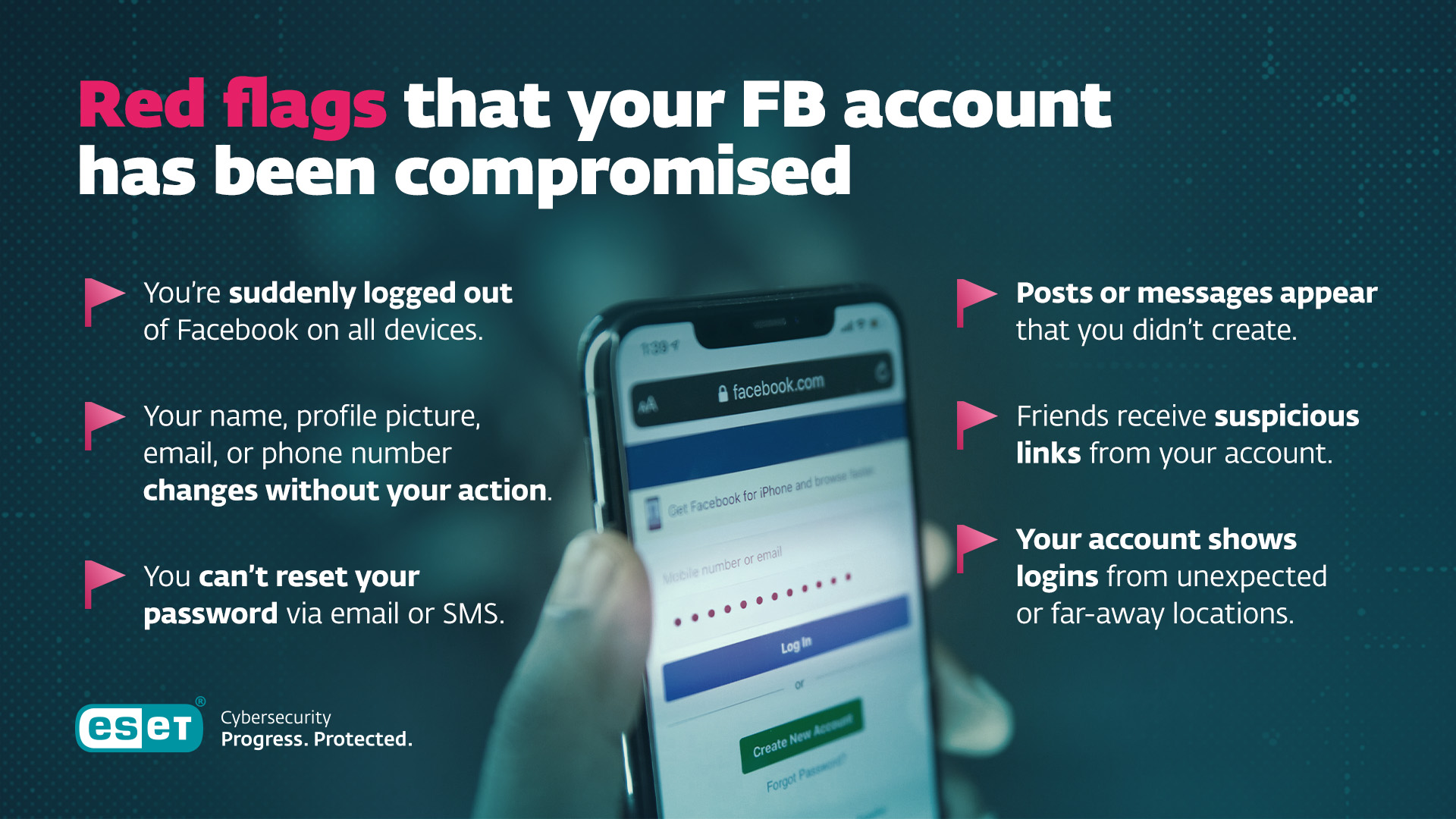
There are some clear red flags that your Facebook account has been compromised. One is that you suddenly find you have been logged out of your account on every device you usually use to access it.
Then there are other, potentially less obvious warning signs: your profile suddenly changes to a new name or profile picture, or your email account or mobile number in your account’s About page changes. This also often leads to you not being able to reset or change your password via email or SMS.
Finally, there may well be even louder alarm bells: posts or messages you didn’t write start popping up, and your friends and contacts tell you your account is sending them suspicious-looking links (that they, hopefully, haven’t clicked on).
At this point, if you still have access to your account, it’s worth going to your profile image in the top right hand corner of your Facebook home page, selecting Settings & privacy, then Settings, then the Activity log image in the middle of the page, and then checking the Where you’re logged in menu toward the bottom of the page. If your account is logged in from more locations than you’d expect – and more far-flung locations at that, then you may be looking at signs of a compromised Facebook account.
Further signs your Facebook account may have been compromised
Here are a few more subtle signs your account may be at risk or that you have been hacked already.
- If you already have two-factor authentication enabled, and your chosen 2FA method is not working, then that’s a worry. You can use a passcode and authentication app like ESET Secure Authenticator or Google Authenticator, or plain old SMS messages for 2FA.
- You’ve received an email or a message via Facebook saying someone is trying to, or has successfully logged in, and it isn’t you.
- You get an email from Facebook telling you an email address or mobile number has been added or removed from your account – or that your password was changed, and you didn’t change it. By the way: Facebook automatically alerts the existing email address on a Facebook account to changes in address, specifically to help users protect their accounts. Check your email account (and the spam folder) to see if you’ve received an email like that. Don’t immediately click on the link (to avoid potential phishing attacks posing as Facebook messages), but do read and absorb the contents of the email before going to your Facebook account in the usual manner.
Why would someone want to steal my Facebook account?
It’s not for your collection of cute kitten pictures, unfortunately. Once they’ve gained access to your Facebook account, attackers may use it to send malicious phishing messages to your contacts, or post suspect investments or cryptocurrency scams on message boards. They can also use your account to impersonate business Pages or Ad accounts for more sophisticated frauds, steal your photos and messages, or just sell the whole account to a bot farm as a compromised account.
Can I get my Facebook account back?
Absolutely – but you need to act fast.
Meta has automated tools to support account recovery in situations like this, but while it’s possible to recover an account in minutes, be prepared to wait between seven and 10 days to regain control of your Facebook account.
If you’re still logged into your hacked Facebook account
Open a browser window and type in facebook.com/hacked, then hit the Enter key. Select the correct answer for the question asked there – in this situation, Someone got into my account without my permission... is probably the most appropriate. A reassuring robot doctor image will load next – with a handy wizard to guide you through the process of resetting your account password.
At this point, if you haven’t already, it’s worth enabling one or more two-factor authentication (2FA) methods. Text messages (also known as SMS) have been joined by purpose-made Authenticator apps from Google, Microsoft, ESET and others. The latest tool in this particular arms race is Passcodes. Basically, if you can authorize the device you’re using with biometrics, you can also authorize apps like Facebook. In this context, biometrics might include facial recognition or your fingerprint scan.
Once you’ve regained access, follow the steps in the wizard, or in our guide above, to remove any unknown devices or sessions, and take the time to review apps and integrations. This can be through the Settings & Privacy menu we showed you earlier – scroll down the lefthand menu and look for Apps and Websites and Business Integrations, removing anything that you don’t recognize or use regularly. Meta publishes a helpful guide on this topic here.
If you’re logged out – basic recovery
On a web browser, go to facebook.com/login/identify, enter any email address, phone number or name associated with your account, and follow Meta’s photo ID prompts to prove you are who you say you are. Once you’ve done this, go to facebook.com/hacked and repeat the steps above to recover your account.
If you’ve also lost access to your phone or email
Go to facebook.com/hacked and select the ‘My login info was changed’. You’ll need to supply any previous email, phone number or name you have used, or name people on your friend list. Sadly, if you previously had the time and foresight to set up Trusted contacts, we’re afraid there’s bad news – Facebook has discontinued this method of account recovery, which let your friends receive a link code for you to log in.
If email, phone, and password were changed on your stolen account
This is worst-case, but don’t despair. It’s still possible to recover your account via the hacked portal. Go to facebook.com/hacked, select ‘I think someone else is using my account’, complete the automated recovery as before, or submit an ID verification if that fails. Another option is to create a new account and report the compromised one using Find Support or Report Profile – but beware this may mean your original, compromised account, is deleted.
If you have a Facebook Business account, or if you manage Ad accounts
There’s a slightly different ‘help’ process if you manage Advertising for a Facebook account, or if you help run a Facebook Business account. Go to business.facebook.com/help and follow the steps there to recover your account.
If nothing else works
If you have an Instagram account and have linked it to your Facebook account, there is an alternative recovery path. It’s also worth messaging or tagging Meta and Facebook’s other social media accounts and asking for assistance.
Once you’ve recovered your account
To avoid a repeat it’s worth taking the time to lock your account down and use cyber security best practice: Enable 2FA, preferably with an authentication app on a mobile device. Set your password to something appropriately complex, ideally using a browser-based password manager app to generate and store it. Consider changing your password on a regular basis.
Don’t click on links in emails or on web pages; instead, type the address into the browser bar. Avoid logging in on a shared device like a public computer in an internet café or library, and be cautious of random public Wi-Fi access points: a paid for VPN service is probably advisable if you must use public Wi-Fi.
How ESET enhances protection following a Facebook hack
Even cautious users can overlook phishing traps. ESET adds a safety net with:
- Anti-Phishing & Link Scanner: Warns or blocks spoofed login pages before you visit them
- Secure browsing mode: Ideal when recovering accounts or handling sensitive actions
- Malware & remote access protection: Blocks spyware or rogue tools scammers deploy
- Email threat detection: Flags suspicious messages pretending to be from Facebook
- Identity Protection: Proactively scanning the dark web for data breaches and leaked personal information.
Together, these tools reinforce your recovery and help prevent future account takeovers - so even if a scam link hits your inbox, it’s stopped before you click. To access these features, explore how ESET HOME Security protects your digital life across different OS and devices – laptops, phones, tablets, and TVs.
Expert insights
“As the value of individual social media profiles – especially well-connected accounts with large followings or specialized content – has skyrocketed, so has the interest of cybercriminals in them. With billions of users, global social media platforms like Facebook, X, Instagram, and TikTok have inevitably become prime targets. Attackers have evolved far beyond simply posting spam or sharing malicious links on victims’ profiles; today, hijacked influencer accounts are often silently leveraged to spread large-scale scam campaigns, or they’re sold for further misuse. At the same time, individual accounts can also be valuable, as they can be misused to scam the victim’s contacts and/or harvest sensitive information for further targeted attacks.
What remains constant, however, is that most account takeovers start with manipulation of the victim into performing a harmful action –such as clicking on a malicious link, giving up their password, or downgrading the security of their profile. That’s why it’s crucial for users to remain vigilant: keep profiles private, use strong and unique passwords, enable two-factor authentication or passkeys, and maintain good cyber hygiene. Combining these habits with reliable security solutions dramatically reduces the risk of falling victim to these modern threats.”
- Ondrej Kubovič, Security Awareness Specialist
Conclusion
Facebook’s star may be beginning to wane: last year, for the first year, it recorded fewer users than before. That doesn’t mean it’s going anywhere any time soon, of course – but it is a sign that people are spending less time on this platform. But Facebook is still useful and valuable to literally billions of people, and that makes active, lively, well-connected accounts very attractive to attackers.
Forewarned is forearmed: before you need to use the tips and tricks above, you’d be wise to lock down your Facebook account and check that your security measures are up to date.
Frequently asked questions
What can I do to prevent losing access to my Facebook account?
Change your password regularly and set up two factor authentication. SMS can be spoofed, so a recognized mobile authenticator app should be on your list of things to consider.
What behavior risks an account takeover on Facebook?
Avoid clicking on random links, signing up for random Facebook Apps or accepting friend requests from people you don’t already know.
Should I check my PC and mobile for signs of compromise?
Absolutely – it’s one of the potential vectors for attack, so if you don’t already, run those malware scans!
I don’t really use Facebook any more except for one or two things. Can I lock it down further?
Yes. Visit the privacy center we pointed to above and select the options to remove wider visibility of your account. If only your friends and members of Groups you join can see your posts, then you’ve made your account less attractive to potential attackers – assuming they see it in the first place. Bear in mind this is only security through obscurity, however.


