
Cybersecurity has always been an arms race between attackers and defenders, but the rise of AI tools has accelerated this battle like never before.
Take spearphishing as an example: Cybercriminals traditionally spent hours or even days gathering data to craft convincing, personalized emails that trick victims into revealing sensitive information or downloading malware. Today, AI reduces that process to mere minutes.
Attackers also use advanced concealment techniques, such as embedding malicious URLs in QR codes or disguising phishing attempts as calendar invites to boost success rates.
To counter these evolving threats, businesses need a prevention-first strategy and AI-powered protection capable of spotting phishing attempts that humans might miss.
Since its launch in 2020, ESET Cloud Office Security has continuously enhanced its detection capabilities, delivering advanced protection for Microsoft 365 and Google Workspace against malware, phishing, and spam. Recently, ESET expanded its features to detect deceptive phishing tactics, including malicious QR codes and calendar invites. The results speak for themselves: tens of thousands of threats have been detected since then.
Key points of this article:
- As cybercrime advances, phishing is getting more sophisticated, and many common awareness tips are losing their relevance, with traditional guidelines needing to be updated.
- Global data shows that phishing is among the most common attack vectors, losses may reach millions of dollars, and AI makes things even worse with currently 16% of data breaches involving attackers using AI.
- Businesses need to address this threat with prevention and AI-powered protection, checking even those aspects of phishing emails that human eyes cannot.
- ESET has been continuously improving ESET Cloud Office Security protecting Microsoft 365 and Google Workspace with new features capable of spotting threats even in carefully crafted spearphishing emails.
Phishing on steroids
Before exploring concealment techniques in phishing messages, let’s look at how this threat has evolved.
Phishing is one of the oldest social engineering tactics, relying on impersonation and urgent calls to action tricking users into revealing sensitive data or downloading malware. Messages like “Your password has expired, click here to renew” were once easy to spot, so phishing success mostly depended on the sheer volume of them sent.
For a long time, awareness (and spam filtering) was the best defense. Employees were trained to look for red flags such as grammar mistakes, urgent language, unexpected serious requests, dubious sender addresses, or suspicious URLs.
However, as cybercrime has advanced, many of these tips have almost lost relevance and emerging AI tools may deliver the final blow against this traditional approach.
It’s not just that phishing emails are more elaborate; AI has made them more convincing and easier to mass-produce. For example, IBM found that generative AI reduced the time to craft a convincing phishing email from 16 hours down to just five minutes.
Expert insights:
“AI has made everything faster. ESET telemetry shows that the majority of cyberattacks against businesses begin with phishing emails. Traditionally, phishing tricks people into revealing personal data or downloading malware. Spearphishing goes further, utilizing personalized messages after attackers gather details about a specific target. Today, AI automates this process, making spearphishing the norm.
For example, you publish a post about being at some conference on social media, and the next day you might receive a fraudulent email from a person claiming to have met you there, offering photos and wanting to connect with you. For an unskilled person, it is easy to get hooked and click on a malicious link.”
- Július Selecký, ESET Solution Architect
And we can already see these trends in numbers:
- ESET telemetry shows that 34% of all detected malware is delivered through phishing.
- The majority of breaches (60%) involve a human element, according to Verizon’s 2025 Data Breach Investigations Report (DBIR).
- Phishing is the most common attack vector (16%) and with an average $4.8 million per breach, it is also one of the costliest, according to IBM’s Cost of a Data Breach Report 2025.
- On average, 16% of data breaches involved attackers using AI, most often for AI-generated phishing (37%) and deepfake impersonation attacks (35%), according to IBM’s report.
Obfuscation techniques
To make phishing more effective, cybercriminals use various obfuscation techniques such as:
Email sender spoofing – Attackers configure the “From” address to appear as a trusted sender. They often also manipulate the “Reply-To” field so replies go to the attacker, even though it looks legitimate.
Homoglyph attack – Homoglyph or homograph attacks exploit similarities between letters and symbols. For example, the domain name “℮s℮t.com” isn’t the real ESET domain name, because it uses estimated symbols “℮” instead of the alphabet letters “e.”
Typosquatting – Similar to homoglyph attacks, typosquatting also uses visual tricks to make phishing links look more legitimate. Instead of swapped characters, it relies on small typos, such as using “eseet.com” instead of “eset.com” as a sender’s email domain.
Quishing – Quishing, or QR phishing, embeds malicious URLs into QR codes to trick users into visiting fake websites to steal sensitive information or install malware. The URL is not exposed in the email body, meaning that the users can see it only after they scan it with their smartphone – taking the threat to the smartphone environment, which is often less secure.
A malicious calendar invite – This attack uses fake calendar invitations to deliver phishing links, which are often automatically added to users’ calendars bypassing traditional email filtering. Gmail and many other calendar applications automatically add external invites as “tentative” appointments without user approval, sneaking events into the calendar without a single click.
What can businesses do?
When facing these sophisticated attacks, businesses need to establish a prevention-first approach mitigating threats as early as possible to avoid damage or minimize an incident’s impact.
Here is a brief description of this approach in the context of phishing emails:
Minimize the attack surface – When an email with a malicious attachment arrives, it is first processed through a business’ cloud email service, only after which it appears in an employee’s mailbox. If the email contains a QR code or a PDF, the employee will likely open or use their smartphone to read it. All these environments need to be protected by creating multiple layers of security.
Reduce complexity – Protecting these environments with multiple security solutions such as cloud app security, endpoint protection, mobile devices protection, and so on requiring separate sign-ins is a complex task. This can lead to gaps in visibility and alert fatigue, resulting in loss of control. Ideally, businesses should consolidate management under a single pane of glass and consider offloading tasks to a Managed Detection and Response (MDR) provider.
Boost your cyber hygiene – Many email-based threats can be prevented with best practices like regular updates, patch management, encryption, and security policies. To simplify these routines, IT teams should rely on automated solutions.
Stay ahead of compliance – Regulatory requirements are often based on proactive measures such as awareness training about various cyberthreats including phishing and spearphishing, pinpointing their tell-tale signs to reduce potential human error.
Prevent breaches with ESET Cyber Awareness Training!
A word about awareness
Spotting phishing emails these days might be difficult, therefore, employees need to develop a deep understanding of how particular cyberattacks work.
Here are some tips how to spot spearphishing emails:
Check the sender’s address carefully: Watch out for homoglyphs. Be wary if the name shown does not match the actual email address in the “From” field.
Look for unusual language or tone: Spearphishing emails often mimic someone you know and are well-written but may have odd phrasing, an unusual sense of urgency, or requests that feel out of character for the sender.
Inspect links before clicking: Hover over links to check the real URL and when using QR scanner, if possible, check the URL before clicking on it. Watch for misspellings or domains that don’t match the legitimate organization.
Verify attachments: Malicious attachments often use unusual file extensions such as .exe or .zip. Don’t get fooled by the name of the attachment or its icon. For example, a malicious attachment may appear as PDF using the PDF icon and the “PDF” abbreviation in the name of attachment, but the real extension may be different.
Cross-check requests: If the email asks for sensitive info or a funds transfer, confirm the request via a separate channel (phone call, official chat).
Want to know more about the most common scams targeting small businesses? Check this blog.
ESET AI-powered security comes to help
ESET Cloud Office Security is an AI-powered solution utilizing a combination of spam filtering, anti-malware scanning, anti-phishing, and advanced threat defense with cloud sandboxing to protect businesses’ communications, collaboration, and cloud storage.
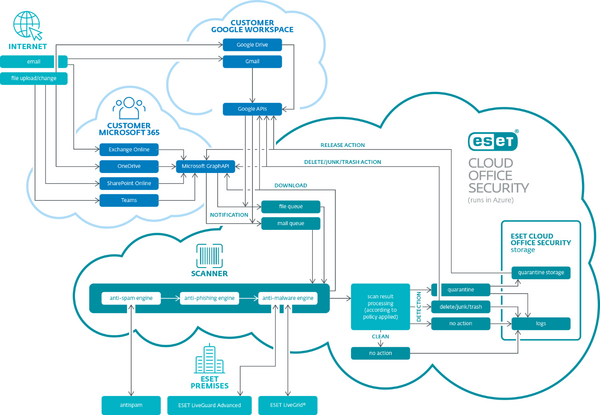
Description:ESET Cloud Office Security overview diagram.
Seeing improvements in phishing attacks, in 2024, ESET boosted its cloud application protection with Anti-spoofing, a feature that identifies and prevents attackers from pretending to be trusted sources, and Homoglyph protection, which detects malicious email domains pretending to be legitimate through the substitution of letters with similar characters or letters from other alphabets.
Recently, ESET Cloud Office Security got two new features dealing with other types of obfuscation techniques in phishing emails:
Malicious QR code detection – This feature recognizes potential quishing attacks by identifying QR codes in emails, extracting embedded links, and scanning them using ESET anti-phishing, anti-malware, and anti-spam engines. This helps block malicious URLs before users can access them.
Malicious calendar invite protection – Scans calendar invites and related emails for spam, phishing links, malware, suspicious attachments, and embedded QR codes. If a threat is detected, both the email and the calendar event are automatically removed, preventing fake meeting requests from reaching users.
To reduce complexity, ESET Cloud Office Security can be integrated with Microsoft 365 or Google Workspace in just a few minutes, enabling immediate protection. The solution supports multi-tenant management for tens of thousands of users – new employees are automatically protected without manual onboarding. Suspicious emails can be quarantined, managed, and investigated easily through an intuitive dashboard.

Attackers perfect their tools, do the same
A single phishing email can cripple a business of any size, and with cybercriminals perfecting their tools and tactics, this threat is more serious than ever.
While businesses can’t stop attackers from using AI to gather intelligence and launch spearphishing campaigns, they can raise multiple layers of defense to detect and block phishing attempts. Awareness training remains important, but automated, AI-powered protection is essential to identify threats that human eyes simply cannot.
ESET Cloud Office Security provides robust protection against attack vectors originating from email and collaboration platforms, stopping phishing attacks before they do any harm.
Get ESET Cloud Office Security full 30-day free trial now!
Frequently asked questions:
What is phishing and why is it dangerous?
Phishing is a social engineering tactic that uses impersonation and urgent calls to action to trick users into revealing sensitive data or downloading malware.
How has phishing evolved over time?
Phishing used to rely on volume and obvious tricks like poor grammar or suspicious URLs. Today, attackers use AI to craft convincing messages quickly and at scale—IBM reports AI can reduce phishing email creation time from 16 hours to just 5 minutes.
How common are phishing attacks?
Phishing is likely the most common attack vector. ESET telemetry shows that 28.2% of all detected malware is delivered via phishing.
What obfuscation techniques do attackers use?
- Email Sender Spoofing: Fake “From” and “Reply-To” fields.
- Homoglyph Attacks: Using similar-looking characters (e.g., “℮s℮t.com” instead of “eset.com”).
- Typosquatting: Slight misspellings (e.g., “eseet.com”).
- Quishing: Malicious QR codes hiding URLs.
- Malicious Calendar Invites: Fake invites bypassing email filters and auto-adding to calendars.
How can businesses protect themselves?
Adopt a prevention-first approach involving minimizing the attack surface, reducing complexity, boosting cyber hygiene, and staying ahead of compliance.
How does ESET Cloud Office Security help?
ESET Cloud Office Security offers AI-powered protection for Microsoft 365 and Google Workspace, combining spam filtering, anti-malware, anti-phishing, and cloud sandboxing. ESET is continuously updating cloud applications protection to spot even the most sophisticated phishing.