Privacy-first iPhone protection:
no mandatory sign-ups, no data selling

TRUE NO-LOGIN ACCESS
Simply open the app and start protecting your iPhone. Free users can get started without creating an account, providing an email address, or completing verification.

A QUIETER SECURITY EXPERIENCE
Enjoy lightweight protection without fear-based messaging, intrusive advertising, or excessive upgrade prompts.
NO DATA BROKERING
ESET does not sell or broker your personal data. We are committed to protecting your privacy—not treating your data as a product.


Want more?
Try ESET Mobile Security Premium free for 30 days
Maximize your defense with a premium subscription—proactive security for a smooth performance
ANTI-PHISHING
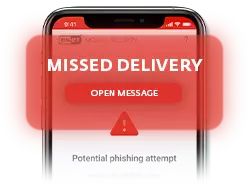
Continuous, real-time protection for Safari. Block malicious websites designed to steal sensitive information, including usernames, passwords, banking details, and credit card information.
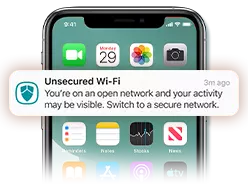
CONNECTION SECURITY
Connecting to public Wi-Fi? Connection Security monitors your network, alerts you to potential risks, and recommends what to do next.
Your iOS security is strong—but smart scam protection goes further
Apple’s built-in protection is excellent at protecting the operating system, but it can’t stop a human from clicking a malicious link. Social engineering, phishing, and targeted credential theft can still get through—and that’s where ESET Mobile Security for iOS comes in.
Case in point:
The DarkSword Exploit
DarkSword was a sophisticated cyberattack that used deceptive links to compromise outdated iPhones and access sensitive data. Apple has since fixed the security flaws behind the attack—a strong reminder to install iOS updates promptly.
- Link Checker helps you verify suspicious URLs before opening them.
- Anti-Phishing helps block malicious pages while you browse in Safari.
- Storage Check helps keep your iPhone ready for critical iOS security updates.

Frequently asked questions
Understanding your iPhone security
If iOS already has built-in security, does an iPhone even need antivirus?
Apple includes strong built-in security features such as sandboxing, code signing, and app review, but iOS does not include a traditional built-in antivirus scanner. While these protections help secure the operating system, they cannot prevent phishing attacks, scam links, credential theft, or social engineering.
Modern iPhone security apps focus on these real-world threats. ESET Mobile Security for iOS helps users verify suspicious links, identify security misconfigurations, and stay protected against scams and threats that rely on tricking people, rather than on exploiting the operating system.
How can I scan my iPhone for viruses or malware and remove threats?
To check your iPhone for potential malware exposure, open ESET Mobile Security for iOS and run a Device Scan. The scan reviews key security settings, permissions, and potential configuration issues that could increase risk.
If your device shows signs of infection or suspicious behavior: update iOS, remove unknown configuration profiles, clear Safari website data, and review your installed apps. While traditional self-replicating viruses are rare on iPhones, phishing attacks, malicious websites, and security misconfigurations can still expose your data. Device Scan helps identify and address these risks quickly.
How can I tell if my iPhone has been hacked, and what should I do?
Possible signs of a compromised iPhone include unexpected battery drain, unusual data usage, unfamiliar configuration profiles, unknown apps, repeated browser redirects, or unexpected permission requests. If you notice any of these signs, run a Device Scan to review your security status and identify risky settings. Keeping iOS updated, reviewing permissions regularly, and checking suspicious links with Link Checker can help protect you from phishing scams and other targeted attacks.
Is there a free antivirus available for iPhone?
Yes! ESET Mobile Security for iOS offers free antivirus protection for iPhone with no login, email registration, or upfront cost. The free tier includes Device Scan, Link Checker, and Storage Check—part of the broader Device Settings Check feature, which evaluates whether your device is securely configured, including its screen-lock status.
Users who want additional protection can upgrade for Premium features such as Anti-Phishing and Connection Security, while continuing to benefit from the free security tools.
Can an iPhone get malware?
Yes, an iPhone can get malware—although it's less common than on other platforms. Sophisticated exploit chains such as DarkSword have shown that iPhones can be compromised to access messages, location data, and other sensitive information. Phishing and malicious links also remain serious risks, which is why additional iPhone security is valuable.
How do I choose the right security app for iPhone?
The best mobile security app for iPhone should respect your privacy, run without slowing down your device, and protect against real-world threats like phishing. Look for a no-login free tier, transparent data practices, and award-winning detection. ESET Mobile Security delivers all three, backed by 35+ years of cybersecurity expertise and innovation.
How does Link Checker differ from Anti-Phishing?
Link Checker is a manual tool: paste any suspicious URL from SMS, WhatsApp, or a QR code to verify its safety before you click. Anti-Phishing, available with Premium, works automatically by inspecting active Safari web traffic in real time and blocking credential-harvesting pages.
In other words? Link Checker helps you check links from any source, while Anti-Phishing provides continuous protection as you browse in Safari—your real-time safety net.
Does ESET sell my data?
No. ESET is committed to protecting your privacy—not treating your personal data as a product. Free users can get started without providing an email address.
Will ESET slow down my iPhone or drain my battery?
ESET Mobile Security for iOS is designed to be lightweight and distraction-free. It runs efficiently in the background without aggressive pop-ups or constant upgrade alerts, while keeping its impact on system performance and battery life to a minimum.
Does ESET also provide protection for my Android device?
Yes! ESET Mobile Security for Android provides comprehensive protection for your phone and tablet. Browse and bank safely online, connect more securely on public Wi-Fi, and take action if your device is lost or stolen. Automatic scanning and security monitoring help keep you informed, with App Lock and Call Filter included.