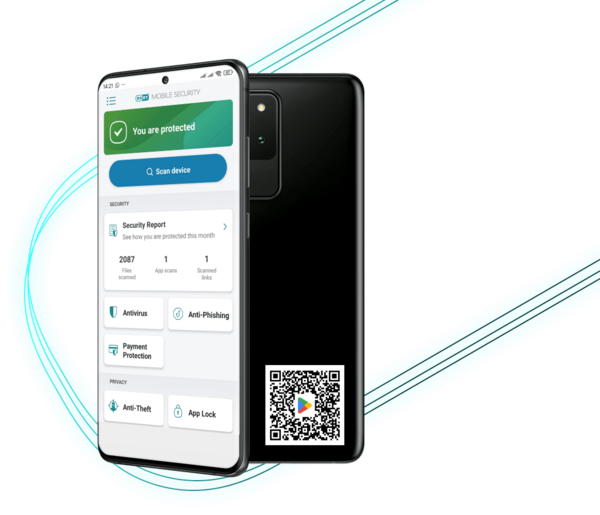
Download free antivirus or upgrade in-app to get Premium features free for 30 days.

Block fake websites, malicious links and scam messages to keep your data private and prevent identity theft.
Feature: Anti-Phishing & Anti-Smishing
Available in paid ESET Mobile Security Premium
Add a security layer to your financial apps so your money and details remain private.
Feature: Payment protection
Available in paid ESET Mobile Security Premium
Remotely lock your device to protect your data, track its location in real time and capture snapshots of whoever has it, increasing your chances of recovery.
Feature: Proactive Anti-Theft
Available in paid ESET Mobile Security Premium
Use a PIN or fingerprint so only you can access your sensitive apps and personal content.
Feature: App Lock
Available in paid ESET Mobile Security Premium
Automatically scan for threats on your schedule without interrupting your day.
Feature: Scheduled scanning
Available in paid ESET Mobile Security Premium
Monitor your settings and permissions to keep your phone secure and optimized.
Feature: Security audit
Available in paid ESET Mobile Security Premium
Stop spam and scam calls so you can focus on what matters.
Feature: Call Filter
Available in paid ESET Mobile Security Premium
Yes, Android devices are vulnerable to various cyber threats like viruses, ransomware, phishing, and smishing. ESET Mobile Security provides essential protection to eliminate them.
ESET Mobile Security is one of the top-rated security apps on Google Play, trusted by millions worldwide. It’s lightweight, battery-friendly, and runs seamlessly without slowing your device.
Powered by advanced, AI-driven threat detection, it protects against both known and emerging threats with exceptional accuracy. Simple to use, highly reliable and built to keep you safe wherever you go. Compare mobile security apps side by side. See how ESET stacks up against other mobile security apps and find the perfect protection for your needs.
Use a dedicated virus scan tool like ESET Mobile Security. Simply install the app and run a Smart Scan for quick detection or an In-depth Scan for a full device check. You can also enable automatic scanning for ongoing protection.
Run a free Android virus scan now
Benefit: Try premium features free for 30 days before deciding.
No, ESET Mobile Security is designed to be lightweight and efficient, ensuring your device runs smoothly.
Payment Protection provides an extra layer of security when using financial apps, preventing malicious apps from reading or replacing on-screen information.
Android 9.0 and higher
Device RAM 512+MB
Touch screen (minimum 480x800px)
Processor: 500+ MHz ARMv7+, 64 bit
Internet connection
Google Play and Accessibility services
Rooted devices are not supported. Some features (for example, Anti-Theft) are not available on tablets that do not support calling and messaging.
Some feature functionality is OS version dependent.
More info: Offering documentation, How to install
Yes. With an ESET HOME Security Ultimate subscription, you get unlimited VPN access for your Android phone and laptop, plus Identity Protection for stronger online safety. The plan also includes ESET Mobile Security at no extra cost—everything you need in one subscription.