A worry-free Android experience: ESET Mobile Security

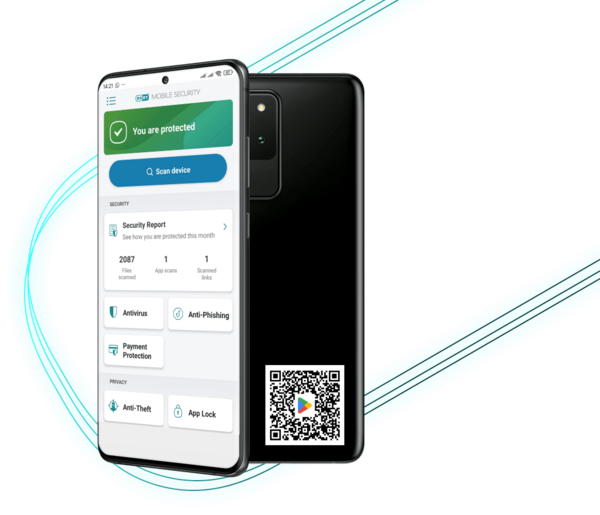
Protect your Android device with ESET Mobile Security. 30+ years of cybersecurity innovation, keeping you safe from viruses, ransomware, phishing scams, smishing and adware.

A worry-free Android experience: ESET Mobile Security

Protect your Android device with ESET Mobile Security. 30+ years of cybersecurity innovation, keeping you safe from viruses, ransomware, phishing scams, smishing and adware.

Download free antivirus or upgrade in-app to get Premium features free for 30 days.



A worry-free Android experience: ESET Mobile Security

Protect your Android device with ESET Mobile Security. 30+ years of cybersecurity innovation, keeping you safe from viruses, ransomware, phishing scams, smishing and adware.

Download free antivirus or upgrade in-app to get Premium features free for 30 days.

Rated 4.8 / 5 by over 1 million ESET users on Google Play


Your first line of AI-powered defense against mobile threats

Trusted protection

Our AI-powered NOD32 technology makes sure every app you download is safe, so you can install with confidence.

Instant safety checks

Real-time scanning automatically checks apps and files to keep your device secure.

!

Antivirus & Antispyware

Protect against online and offline threats, including viruses, trojans, ransomware and spyware.

Always one step ahead

ESET LiveGrid® uses cloud-based intelligence to detect new threats quickly, keeping you protected against the latest dangers.

Your first line of AI-powered defense against mobile threats

Trusted protection

Our AI-powered NOD32 technology makes sure every app you download is safe, so you can install with confidence.

Instant safety checks

Real-time scanning automatically checks apps and files to keep your device secure.

!

Antivirus & Antispyware

Protect against online and offline threats, including viruses, trojans, ransomware and spyware.

Always one step ahead

ESET LiveGrid® uses cloud-based intelligence to detect new threats quickly, keeping you protected against the latest dangers.


Awarded by experts.
Loved by users.
Trusted by millions.

Awarded by experts.
Loved by users. 
Trusted by millions.


Premium features that make all the difference

Premium features that make all the difference

Stop scams before they start

!wwwwww

Block fake websites, malicious links and scam messages to keep your data private and prevent identity theft.

Feature: Anti-Phishing & Anti-Smishing

Available in paid ESET Mobile Security Premium

Shop and bank without worries

Add a security layer to your financial apps so your money and details remain private.

Feature: Payment protection

Available in paid ESET Mobile Security Premium

Recover your phone quickly

Remotely lock your device to protect your data, track its location in real time and capture snapshots of whoever has it, increasing your chances of recovery.

Feature: Proactive Anti-Theft

Available in paid ESET Mobile Security Premium

Keep your apps private

Use a PIN or fingerprint so only you can access your sensitive 
apps and personal content.

Feature: App Lock

Available in paid ESET Mobile Security Premium

Security that runs itself

Automatically scan for threats on your schedule without interrupting your day.

Feature: Scheduled scanning

Available in paid ESET Mobile Security Premium

Close security gaps fast

Monitor your settings and permissions to keep your phone secure and optimized.

Feature: Security audit

Available in paid ESET Mobile Security Premium

Block unwanted calls

!!

Stop spam and scam calls so you can focus on what matters.

Feature: Call Filter

Available in paid ESET Mobile Security Premium


Get all Premium features free for 30 days background

Get all Premium features free for 30 days


Experience the advanced protection trusted by millions worldwide.
Download now and upgrade in the app to get premium features free for 30 days.

Get all Premium features free for 30 days background image

Get all Premium features free
for 30 days

Experience the advanced protection trusted by millions worldwide.

Download now and upgrade in the app to get premium features free for 30 days.


Android safety tips & tricks


Keeping your Android virus-free takes more than just the occasional scan. Cybercriminals are always finding new ways to target mobile devices, so a little extra caution goes a long way. 
Here are some simple, practical tips to boost your protection and catch threats early:

1. Be smart when installing apps

Stick to trusted sources and download apps only from official stores like Google Play. Third-party stores are a common source of malware. Check app permissions carefully during installation. Excessive permissions could indicate malicious intent.


2. Know the signs of Android malware

Watch out for unusual behavior such as frequent pop-ups or intrusive ads, sudden battery drain, slow performance or strange charges on your phone bill.


3. Keep your phone and apps up to date

Updates aren’t just about new features; they often fix security flaws that hackers exploit. Turn on automatic updates so you’re always protected without having to think about it.


4. Think before you click

Recognize Phishing via SMS (smishing). Be cautious with links in unsolicited texts or messages, especially if they sound urgent or promise something too good to be true. Always check sender details, messages pretending to be banks or services that request immediate action are frequently scams.


5. Use the right security tools

Keep your personal data, finances and online activity extra safe by using Antivirus, VPN, Identity Protection and Anti-Theft features—all included 
in the ESET HOME Security Ultimate plan.

Android safety tips & tricks


Keeping your Android virus-free takes more than just the occasional scan because cybercriminals are always finding new ways to target mobile devices.

Here are some simple, practical tips to boost your protection and catch threats early:


1. Be smart when installing apps

Stick to trusted sources

Download apps only from official stores like Google Play. Third-party stores are a common source of malware.

Check app permissions

Review app permissions carefully during installation. Excessive permissions could indicate malicious intent.


2. Know the signs of Android malware

Watch out for unusual behavior

Watch out for unusual behavior such as frequent pop-ups or intrusive ads, sudden battery drain, slow performance or strange charges on your phone bill.


3. Keep your phone and apps up to date

Benefit from updates

Updates aren’t just about new features; they often fix security flaws that hackers exploit. Turn on automatic updates so you’re always protected without having to think about it.


4. Think before you click

Recognize phishing via SMS (smishing)

Be cautious with links in unsolicited texts or messages, especially if they sound urgent or promise something too good to be true.

Check sender details

Check sender details: Messages pretending to be banks or services that request immediate action are frequently scams.


5. Use the right security tools

Rely on trusted security

Keep your personal data, finances and online activity extra safe by using Antivirus, VPN, Identity Protection and Anti-Theft features—all included in the ESET HOME Security Ultimate plan.

Frequently Asked Questions

Is antivirus necessary for Android devices?

Yes, Android devices are vulnerable to various cyber threats like viruses, ransomware, phishing, and smishing. ESET Mobile Security provides essential protection to eliminate them.

What are common signs that my phone has a virus?

  • Your battery drains quickly.
  • Your phone is constantly lagging.
  • You encounter frequent pop-up ads.
  • You find unusual apps you didn't download.
  • Your apps are crashing constantly.

What is the best mobile security app for Android?

ESET Mobile Security is one of the top-rated security apps on Google Play, trusted by millions worldwide. It’s lightweight, battery-friendly, and runs seamlessly without slowing your device.

Powered by advanced, AI-driven threat detection, it protects against both known and emerging threats with exceptional accuracy. Simple to use, highly reliable and built to keep you safe wherever you go. Compare mobile security apps side by side. See how ESET stacks up against other mobile security apps and find the perfect protection for your needs.

How do I install ESET Mobile Security?

  1. Visit the Google Play Store.
  2. Search for "ESET Mobile Security."
  3. Tap "Install" and follow the on-screen instructions.
  4. Open the app and enjoy premium features free for 30 days.

How do I scan for viruses on Android?

Use a dedicated virus scan tool like ESET Mobile Security. Simply install the app and run a Smart Scan for quick detection or an In-depth Scan for a full device check. You can also enable automatic scanning for ongoing protection.

Run a free Android virus scan now

What is the difference between the free and premium versions?

  • Free version: Basic protection with antivirus and real-time scanning.
  • Premium version: Access to advanced features like Anti-Phishing, Anti-Theft, Payment Protection, App Lock and more.

Benefit: Try premium features free for 30 days before deciding.

Will ESET Mobile Security slow down my device?

No, ESET Mobile Security is designed to be lightweight and efficient, ensuring your device runs smoothly.

How does ESET protect my financial transactions?

Payment Protection provides an extra layer of security when using financial apps, preventing malicious apps from reading or replacing on-screen information.

What are the system requirements for ESET Mobile Security?

Android 9.0 and higher

Device RAM 512+MB

Touch screen (minimum 480x800px)

Processor: 500+ MHz ARMv7+, 64 bit

Internet connection

Google Play and Accessibility services


Rooted devices are not supported. Some features (for example, Anti-Theft) are not available on tablets that do not support calling and messaging.


Some feature functionality is OS version dependent.


More info: Offering documentation, How to install

Do you offer a VPN for Android?

Yes. With an ESET HOME Security Ultimate subscription, you get unlimited VPN access for your Android phone and laptop, plus Identity Protection for stronger online safety. The plan also includes ESET Mobile Security at no extra cost—everything you need in one subscription.




AI pioneers banner with stars in background

Secure your digital life with AI pioneers


Join more than 10 million users protected by ESET's advanced mobile security 
and over a billion internet users protected by our technology.

Includes Premium features free for 30 days.

How to check if your router has been hacked—and what to do about it

Read on to understand the warning signs your router may have been hacked, what to do about it, and how to prevent it from being compromised in the future.

Márk Szabó  01 Oct 2025  •  4 min. read

The ultimate guide to hiding apps 
on your iPhone

iOS apps enhance our digital lives—but they can also clutter, distract, or compromise your privacy.

Ben Tudor  25 Sep 2025  •  12 min. read